
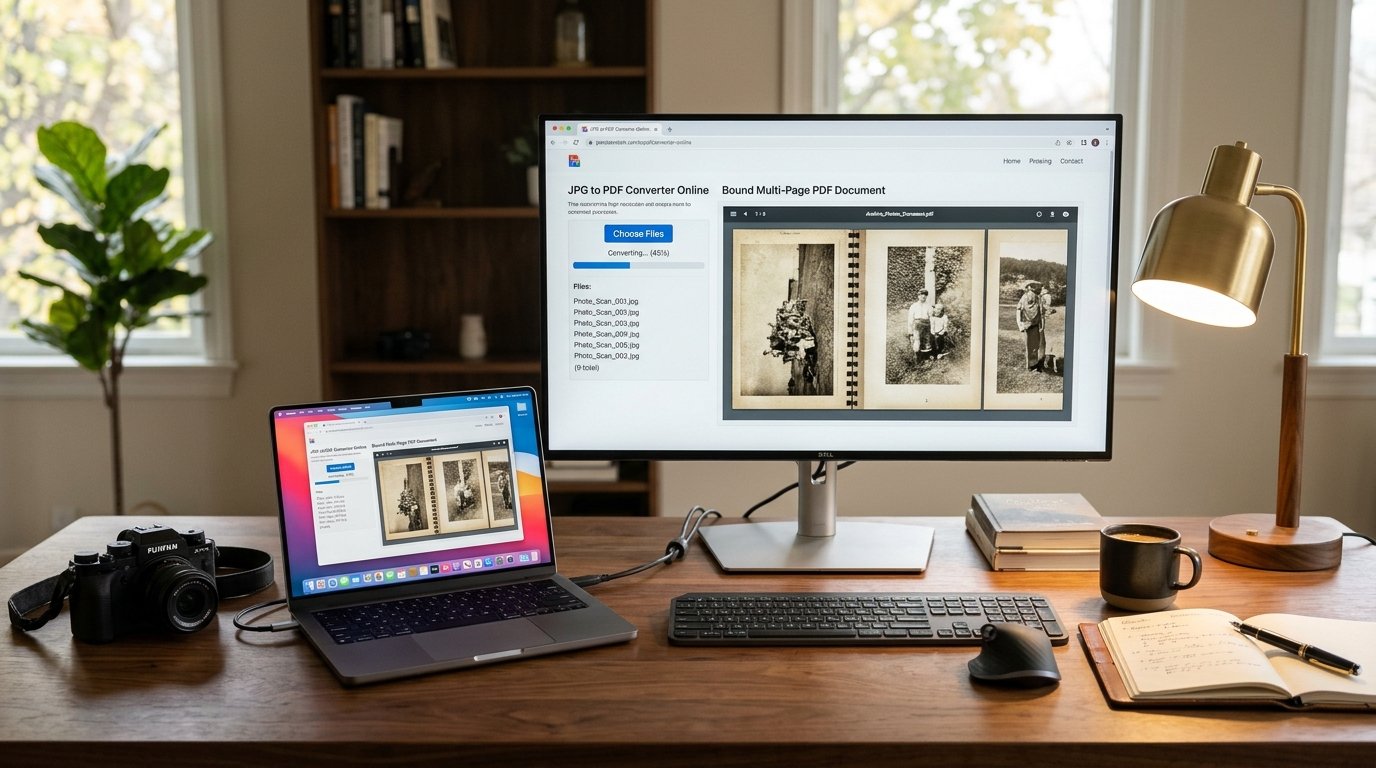
Utilizing a reliable jpg to pdf converter online has become an essential everyday workflow for millions of students, creative professionals, corporate attorneys, and business operators across the globe. In an era where mobile smartphones capture ultra-high-resolution images of physical documents, receipts, whiteboards, and artistic portfolios, managing dozens of unorganized image files quickly creates digital clutter. Whether you are packaging scanned identity documents for a mortgage application, bundling high-res graphic designs into a presentation portfolio, or consolidating paper expense receipts into a single tax binder, finding a fast, secure jpg to pdf converter online is vital in 2026.
While the Joint Photographic Experts Group raster standard, established under ISO/IEC 10918-1, remains unmatched for compressing complex photographic imagery, it lacks document structure, multi-page sequencing, and searchable text layers. Conversely, the Portable Document Format, standardized internationally under ISO 32000-2 (PDF 2.0), provides a universal, tamper-evident digital paper container recognized by every legal court and enterprise system. In this comprehensive, authoritative master guide, we explore the science of image encapsulation, compare modern client-side conversion architectures, provide step-by-step assembly instructions, and demonstrate how platforms like ulovepdfs deliver frictionless document conversion without subscriptions or privacy compromises.
1. Understanding the Need for a JPG to PDF Converter Online
Modern mobile phones, mirrorless cameras, and flatbed document scanners produce vast volumes of raster images every day. While sending someone fifteen separate JPEG file attachments over an email thread is technically feasible, it creates severe communication friction. Recipients are forced to download each image individually, guess the chronological reading sequence, and wrestle with inconsistent thumbnail orientations across varying operating systems. By utilizing an automated jpg to pdf converter online, users can combine arbitrary sets of independent images into one elegant, universally readable document file.
Furthermore, standard image formats lack administrative access controls, cryptographic document signatures, and standardized page layout properties like ISO A4 or US Letter dimensions. When applying for government permits, submitting academic assignments, or filing insurance reimbursement claims, administrative submission portals almost universally reject individual image uploads in favor of compiled PDFs. An intuitive jpg to pdf converter online bridges this gap instantly, formatting raw camera frames into audit-ready corporate folios.
Multiple detached files, missing reading order, unstandardized dimensions, no password protection, and high risk of recipient confusion or missed attachment pages.
Single click download, standardized A4/Letter margins, guaranteed page ordering, universal mobile/desktop compatibility, and enterprise legal admissibility.
2. The Technical Bridge: Raster Pixels vs. Vector PDF Container Architecture
To fully appreciate what happens when you process files through a jpg to pdf converter online, it is helpful to understand the underlying file specifications. A JPEG file is a fixed grid of color pixels compressed using discrete cosine transform (DCT) mathematical lossy algorithms. The file consists of raw pixel rows, metadata tags (EXIF), and color space definitions (such as sRGB or Adobe RGB). It possesses no intrinsic concept of “pages”, “margins”, “headers”, or “vector scaling”.
In stark contrast, a PDF file is an object-oriented document container. A PDF does not simply show an image; it constructs a mathematical coordinate system (traditionally measured in typographic points, where 72 points equal 1 inch). When a modern jpg to pdf converter online runs, it does not necessarily re-compress or degrade the original raster pixels. Instead, it embeds the compressed JPEG stream directly into a PDF /XObject dictionary and wraps it with a page object defining exact media box dimensions (such as [0 0 595.28 841.89] for standard A4 paper). This direct encapsulation ensures zero loss in visual image fidelity while gaining all the benefits of the PDF format.
As illustrated in Figure 1 above, a premier jpg to pdf converter online provides visual thumbnail drag-and-drop interfaces. This intuitive visual ordering enables creators to arrange photo prints, scanned document pages, and diagrammatic inserts in sequential storytelling order prior to executing the binary compilation pass.
How a Streamlined Online Converter Encapsulates JPEG Streams
Inside a compiled PDF document, the original image is represented losslessly through a specialized stream object:
<<
  /Type /XObject
  /Subtype /Image
  /Width 3840
  /Height 2160
  /ColorSpace /DeviceRGB
  /BitsPerComponent 8
  /Filter /DCTDecode
  /Length 1420842
>>
stream
... [Raw JPEG Binary Stream Embedded Without Re-Encoding] ...
endstream
By utilizing the native /DCTDecode filter, an advanced jpg to pdf converter online avoids the generational compression artifacts common in low-quality converter scripts, preserving 100% of your camera sensor’s original sharpness.
3. Image Compression, DPI Resolution & Document Quality Trade-Offs
One of the most frequent dilemmas when operating a jpg to pdf converter online revolves around the delicate balance between document resolution (measured in DPI – Dots Per Inch) and final PDF file weight. A typical 48-megapixel camera capture from an iPhone or modern Android smartphone can easily generate a 15MB JPEG file. If you compile twenty of these photos into a single PDF without optimization, you end up with a gargantuan 300MB document that will fail email delivery limits and crawl when rendered on mobile devices.
Understanding target resolution standards empowers you to configure your jpg to pdf converter online for optimal results:
Screen & Web Display
Ideal for online job portals, email attachments, and casual web sharing. Yields files typically smaller than 2MB for a 10-page document while looking crisp on modern monitors and smartphone displays.
Office & Standard Print
The industry standard for corporate contracts, academic dissertations, and commercial invoices. Produces clean physical prints on office laser printers without ballooning storage footprints.
Fine Art & Publishing
Preserves micro-detail for architectural schematics, medical imaging scans, and commercial magazine photography. Best suited for high-end digital presses and archival record keeping.
If you find that your source photos require dimension adjustments before compilation, you can quickly preprocess them using our dedicated Browser Image Resizer or crop unwanted borders using the Client-Side Image Cropper to guarantee every page looks pristine.
4. Step-by-Step Guide: How to Convert Multiple JPGs into a Single PDF Online
Converting a stack of photo captures into an organized, unified document takes less than 30 seconds when utilizing a modern jpg to pdf converter online. Here is the authoritative four-step procedure:
Step 1: Upload Your Target JPG / JPEG Images
Drag and drop your images directly into the browser drop-zone of your jpg to pdf converter online. Modern tools support simultaneous multi-file selection, enabling you to select 5, 20, or even 100 images at once from local storage or cloud drives.
Step 2: Visually Arrange Page Sequence & Orientation
Examine the interactive thumbnail gallery. Drag thumbnails horizontally or vertically to arrange the exact page sequence. Use individual rotation controls to rotate sideways camera captures 90 or 180 degrees so that every document page reads right-side-up.
Step 3: Configure Margin Settings & Page Sizing
Choose whether to fit images edge-to-edge (zero margins) or add standard document borders (small or big margins). Select your target sheet format (ISO A4, US Letter, or auto-fit image dimensions). If your portraits are portrait-oriented and your landscape diagrams are wide, set orientation to “Auto” to preserve native dimensions.
Step 4: Generate, Preview & Download Your PDF
Click the convert button. The jpg to pdf converter online assembles the binary PDF structure in seconds. Download the finalized PDF binder directly to your device, ready to be emailed, printed, or securely archived.
In mobile business environments, as highlighted in Figure 2, on-the-go professionals capture fuel slips, dining invoices, and client receipts directly from their smartphones. By accessing an in-browser jpg to pdf converter online on iOS Safari or Android Chrome, expense tracking becomes instantaneous without installing bloated native scanner applications.
5. Page Orientation, Margins & Aspect Ratio Formatting Standards
A frequent mistake during image-to-document compilation is overlooking aspect ratio mismatches. A standard 35mm DSLR or mirrorless camera sensor shoots in a 3:2 aspect ratio (e.g., 6000×4000 pixels). Meanwhile, smartphone camera sensors typically shoot in a 4:3 or 16:9 ratio. However, standard international paper formats follow strictly defined geometric ratios:
International standard ISO A4 paper measures 210mm by 297mm, producing an aspect ratio of approximately 1:1.414 (the famous square root of 2 ratio). North American US Letter paper measures 8.5 by 11 inches, yielding an aspect ratio of 1:1.294. When a jpg to pdf converter online maps a 3:2 camera photo onto an A4 page, it must apply one of three formatting behaviors:
Scales the entire image so that 100% of the photograph is visible on the page. Introduces subtle white margins along the top/bottom or sides. Recommended for legal documents, invoices, and signed contracts where no content can be cropped.
Expands the image to cover every millimeter of the page canvas without white borders. Crops a small strip from either the edges or top. Recommended for photographic lookbooks and visual art presentations.
Creates custom PDF page dimensions matching the exact pixel aspect ratio of each input image. Eliminates all margins while avoiding any cropping. Ideal for digital proofing and mixed-media design folios.

In technical drafting and architecture, as portrayed in Figure 3, maintaining exact dimensional scale is critical. Engineers rely on a specialized jpg to pdf converter online capable of handling large-format ANSI D and ISO A1 blueprint scans without downsampling vector CAD details or introducing page skew.
6. Real-World Applications: Archiving, Receipts, Portfolios & Blueprints
The versatility of deploying an agile jpg to pdf converter online spans diverse corporate, creative, and educational domains. Understanding these core use cases illustrates why image-to-PDF compilation remains one of the highest-volume digital utility operations on the web:

Academic Research & Course Packets
Students and researchers photograph physical library books, whiteboard lecture diagrams, and handwritten lab calculations. Compiling these images through a jpg to pdf converter online creates chronological study guides that can be highlighted, annotated, and searched across tablet devices.
Real Estate Appraisals & Condition Reports
Property inspectors and insurance adjusters capture dozens of room inspection photographs. Rather than submitting an unstructured zip archive of photos, they compile the images into a standardized inspection binder with page numbers and property headers.
Creative Photography & Graphic Design Portfolios
Visual artists combining portraits with background enhancements—such as our deep guide to photo background change—bundle their best retouched client work into sleek, tamper-proof PDF presentations that preserve color fidelity across client displays.
Government Filings & Certified Visa Applications
Immigration departments and consular portals strictly mandate PDF submissions for passports, birth certificates, utility bills, and bank statements. Converting phone scans into a formal PDF guarantees submission compliance.

As demonstrated in Figure 5, legal practices handle sensitive case exhibits, signed signature pages, and financial audits. Once compiled, these multi-page documents often require final binding with other corporate filings, which can be accomplished effortlessly through our tutorial on how to merge pdf online.
7. Client-Side WebAssembly vs. Traditional Cloud Conversion Privacy
When selecting a jpg to pdf converter online, data privacy and cybersecurity should always remain your paramount consideration. Traditional conversion websites operate on a server-dependent model: when you upload your photos, your sensitive files are transmitted across public internet connections to an unknown remote server cluster in a third-party jurisdiction. The server executes a server-side conversion script (such as ImageMagick or Ghostscript), writes the compiled PDF to temporary disk storage, and returns a download link.
This legacy cloud model carries severe vulnerabilities for medical records, banking statements, and legal agreements. Even when websites promise automated deletion after 60 minutes, data in transit remains vulnerable to interception, caching proxies, and accidental server retention.
- Files transmitted across public network cables
- Sensitive data stored on external third-party hard drives
- Queue waiting times during peak server traffic
- Strict file size limits (e.g., 20MB per upload)
- Risk of non-compliance with GDPR and HIPAA mandates
- 0 bytes uploaded: 100% of conversion runs in local browser memory
- Airtight enterprise data privacy and complete confidentiality
- Zero upload latency: instant instantaneous processing
- No file size caps: handles gigabyte-sized image folders
- Full offline functionality without active internet connection
At ulovepdfs, our technical architecture is built around modern browser sandboxing. Utilizing compiled WebAssembly (Wasm) and JavaScript Streams, our tools perform high-speed document restructuring directly on your local CPU. Your private images never leave your computer, ensuring compliance with strict international confidentiality regulations.
8. Troubleshooting Common Image-to-PDF Conversion Obstacles
Even when using an advanced jpg to pdf converter online, users occasionally encounter edge-case hurdles. Here is how to diagnose and resolve the three most common compilation bottlenecks:
1. Sideways or Inverted Page Orientation (EXIF Glitch)
Smartphones use internal gyroscopes to record photo orientation in the image’s EXIF metadata header rather than physically rotating the pixel grid. Some basic converters fail to read this EXIF orientation flag, resulting in sideways pages. Always verify that your chosen jpg to pdf converter online honors EXIF orientation tags or provides manual 90-degree thumbnail rotation.
2. Enormous PDF File Size Resulting from Raw Camera Scans
If your resulting PDF exceeds 50MB, your camera images likely contain unneeded 4K/8K pixel dimensions for standard A4 reading. Pre-resize your images to 2000px on the longest edge before conversion, or select the “Medium Compression” preset in your converter settings.
3. Blurry Text in Scanned Document Photos
Blurry text occurs when images are shot in low light with high camera sensor noise or downsampled aggressively during compression. Ensure adequate physical lighting when capturing paper documents, hold your device steady, and export at no lower than 150 DPI.
9. Frequently Asked Questions (FAQ)
Below are authoritative, direct answers to the most common questions regarding how to utilize a jpg to pdf converter online effectively.
Is using a jpg to pdf converter online completely free?
Yes. Modern client-side tools available on ulovepdfs enable users to convert unlimited JPG and JPEG files into multi-page PDFs with zero subscriptions, zero daily usage caps, and zero watermarks.
Can I combine multiple JPG files into a single multi-page PDF?
Absolutely. You can select multiple images simultaneously, reorder the page thumbnails visually into your preferred reading sequence, and compile them into a unified multi-page PDF document in a single click.
Will converting JPG to PDF reduce my image quality?
No, provided you use an advanced converter that embeds the original JPEG binary stream directly via the /DCTDecode filter. This lossless encapsulation technique ensures every pixel, color gradient, and sharp edge remains identical to your source photograph.
Can I convert JPG to PDF on an iPhone or Android phone?
Yes. Modern responsive web applications operate directly inside mobile Safari, Chrome, and Firefox without requiring app installations or storage permissions, enabling fast document creation directly from your mobile camera roll.
Are my confidential files secure when using an online converter?
When utilizing client-side WebAssembly converters like ulovepdfs, your security is absolute because no files are uploaded to any external server. All processing executes securely in your local browser sandbox.
10. Final Verdict & The Modern Document Toolkit
The transition from disorganized raster image collections into polished, multi-page PDF documents represents one of the simplest yet highest-yield productivity upgrades for modern digital professionals. By leveraging an enterprise-grade jpg to pdf converter online, knowledge workers eliminate attachment clutter, standardize inconsistent sheet margins, and deliver audit-ready folios that command respect across any corporate or academic audience.
We invite you to explore our comprehensive ecosystem of free productivity utilities at ulovepdfs. From assembling multi-source binders with our guide to merge pdf online and perfecting avatars with our photo background change guide to resizing graphic assets with the Browser Image Resizer, elevate your digital workflow with fast, secure, zero-upload browser technology today.
Written by editor
Full-stack engineer and privacy advocate at ulovepdfs, focusing on browser-native cryptography and high-performance client-side tooling.