

1. What is a Word Counter and Why is it Essential in Modern Publishing?
A high-precision Word Counter has become one of the most indispensable digital utilities for content creators, copywriters, academic researchers, and digital marketers worldwide. In the fast-paced landscape of online media and digital communication, length is never arbitrary. Search engine algorithms, social media network constraints, academic review boards, and advertising networks enforce strict word and character limits that directly determine the visibility and success of your message.
Whether you are drafting a compelling social media hook, polishing a 3,000-word search-engine-optimized article, crafting an academic dissertation abstract, or configuring meta title tags for Google search results, keeping precise track of volume is essential. A single character exceeding an advertising limit can pause a multi-thousand-dollar marketing campaign, while an overly verbose paragraph can cause readers to abandon your article before reaching your call to action.
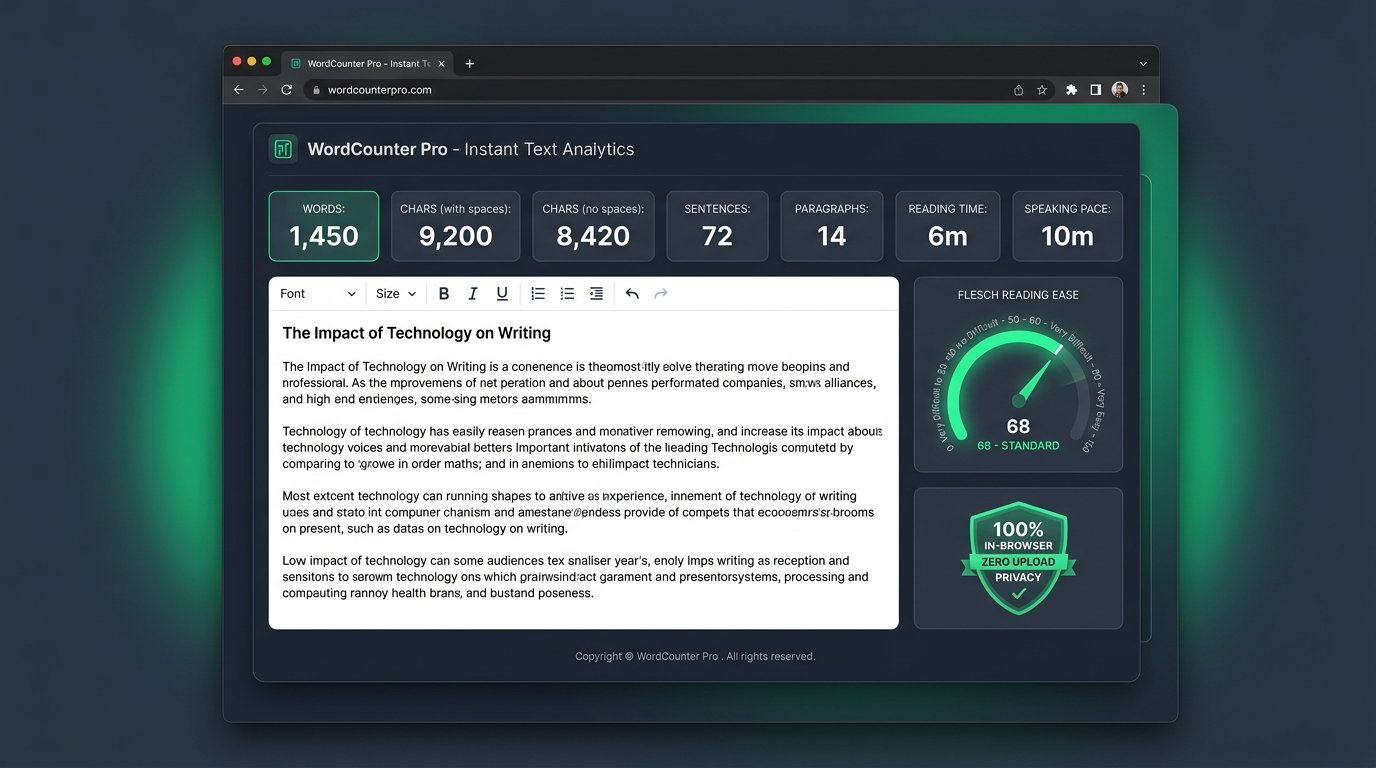
This is where a modern Word Counter proves its true value. Rather than functioning as a rudimentary tally calculator, an advanced online Word Counter acts as a comprehensive real-time textual analysis workstation. It measures total words, characters with spaces, characters without spaces, sentence frequency, paragraph structures, average reading time, speaking pace, and automated readability scores.
By leveraging our interactive in-browser Word Counter & Character Counter, authors can evaluate, trim, and optimize their text dynamically at native processor speeds. Because processing occurs entirely within client-side memory, writers can analyze confidential manuscripts and corporate communications with total privacy assurance.
2. Inside an In-Browser Word Counter: The Algorithmic Metric Engine
To understand how an efficient Word Counter functions accurately, it helps to explore the linguistic parsing algorithms running inside the browser engine. Counting words might seem conceptually simple—until you encounter hyphenated compound words, numerical currencies, contractions, non-breaking whitespace, international alphabets, and mixed emojis. A professional in-browser Word Counter processes raw text through a multi-stage analytical pipeline.

Tokenization and Boundary Scanning
When you type or paste content into the input workspace, the engine strips extraneous control codes and splits the text stream using Unicode-aware regular expression boundaries (such as \s+). Contractions like don’t or we’re are preserved as single lexical units, while punctuation marks attached to word ends are stripped from the word register.
Calculating Characters With and Without Spaces
Different publishing platforms treat whitespace differently. Standard character length calculations include every single space, tab, and line break. However, academic essay competitions and specific translation agencies calculate character counts excluding spaces. A capable character counting tool computes both metrics simultaneously in real time, preventing accidental undercounting or overcounting.
Reading Time vs. Speaking Time Estimates
Audience consumption velocity varies substantially depending on whether text is read silently or delivered orally:
- Silent Reading Time: The average adult reads silently at approximately 200 to 250 words per minute (wpm). The text analyzer divides your total word tally by 225 to generate an accurate estimate for blog posts and articles.
- Speaking / Presentation Time: A comfortable public speaking pace ranges between 130 and 150 words per minute. The tool computes speaking time to assist keynote speakers, podcast hosts, and video scriptwriters in timing their presentations precisely.
3. Flesch-Kincaid & Readability Metrics: What the Numbers Mean
Writing volume is only half the battle; writing clarity is what determines actual reader engagement. The Flesch-Kincaid Readability Tests were developed in the mid-20th century to evaluate document comprehension mathematically. An advanced text metrics engine integrates these formulas to give writers instantaneous feedback on audience accessibility.

The Mathematical Formula of Flesch Reading Ease
The standard Flesch Reading Ease formula computes a score ranging typically from 0 to 100 based on sentence length and syllable density:
Where ASL represents the Average Sentence Length (total words divided by total sentences), and ASW represents the Average Number of Syllables per Word (total syllables divided by total words).
Interpreting the Flesch Reading Ease Score
Understanding where your draft falls on the Flesch scale allows you to adjust vocabulary and sentence structure for your intended readership:
- 90 to 100 (Very Easy): Content easily understood by an average 11-year-old student (5th-grade level). Ideal for casual social media updates and children’s literature.
- 70 to 80 (Fairly Easy): Conversational English written in plain, accessible language. Recommended for mainstream consumer blogs and customer support guides.
- 60 to 70 (Standard): The benchmark range recommended for commercial web content, digital marketing, and news reporting. Under guidelines from the W3C Web Content Accessibility Guidelines (WCAG), maintaining accessible readability ensures broad public comprehension.
- 30 to 50 (Difficult): Academic papers, technical manuals, and corporate annual reports intended for college-educated readers.
- 0 to 30 (Very Confusing): Dense legal contracts, scientific research papers, and regulatory filings with multi-clause sentences and technical jargon.
Google Helpful Content and Readability
Modern search engines prioritize content that satisfies user intent quickly. According to the official Google Search Central Helpful Content Guidelines, content written in concise, straightforward language earns higher user engagement and lower bounce rates. Monitoring your draft in a Word Counter helps ensure your text stays within the optimal 60-70 reading ease threshold.
4. 9 Best Ways to Track Words, Characters, and Readability with a Word Counter
Maximizing the utility of a modern Word Counter involves adopting structured editing workflows. Professional editors and copywriters rely on the following nine practical techniques to elevate content quality and ensure technical compliance across all publishing channels:
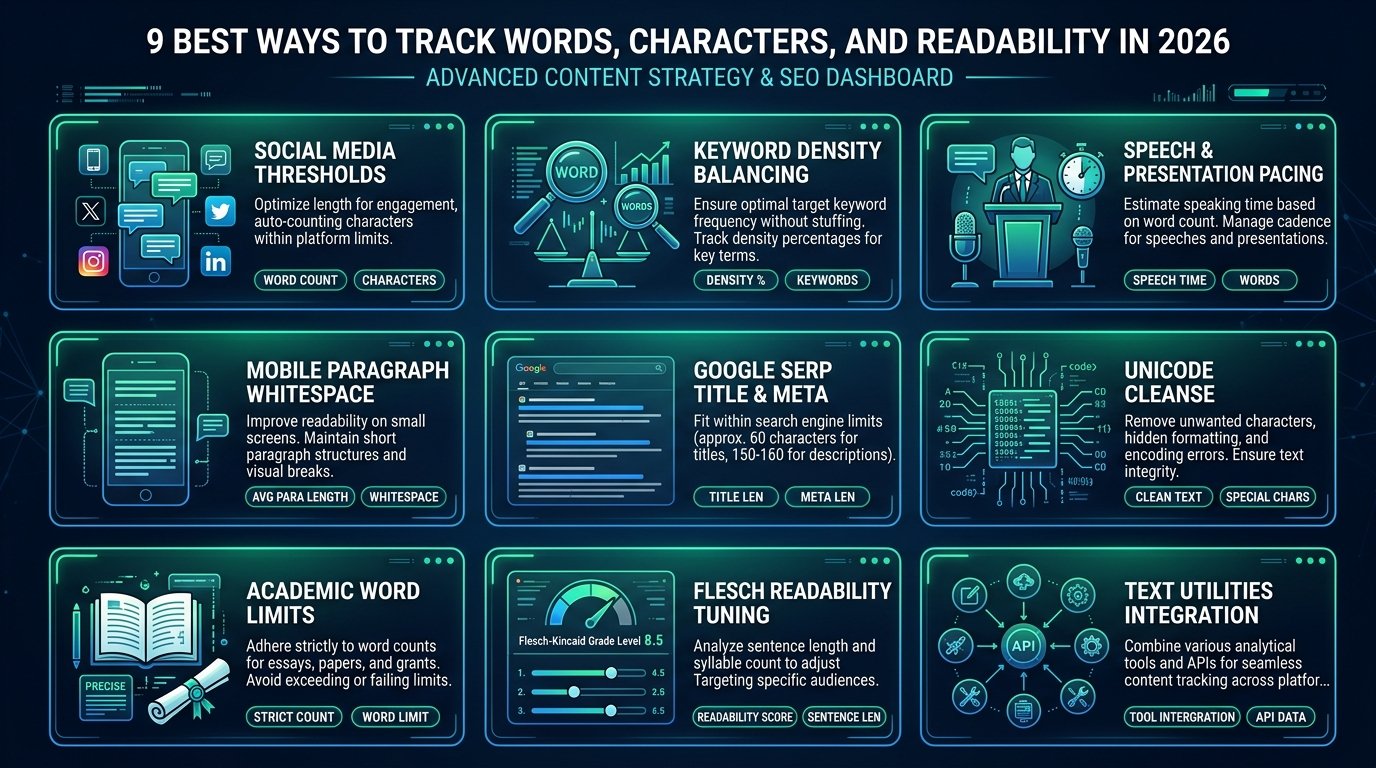
1. Audit Social Media Character Thresholds Before Publishing
Social media algorithms penalize posts that get truncated awkwardly behind "See more" folds. When writing for LinkedIn, Instagram, or Twitter, paste your draft into our Word Counter. Check that your critical hook and call to action fit comfortably within the pre-fold character allowance.
2. Balance Focus Keyword Density Without Content Stuffing
Effective search engine optimization requires maintaining a balanced keyword frequency—typically between 1.0% and 1.5% of total word count. Using an online Word Counter alongside our structured guides—such as our comprehensive breakdown of in-browser JSON formatting and validation—ensures your keyword distribution reads naturally to both human visitors and search crawlers.
3. Calculate Exact Speaking Time for Presentations and Video Scripts
When preparing a YouTube script, podcast outline, or executive pitch, running overtime can lose your audience. By checking speaking time in a Word Counter, you can calculate the exact pacing needed. For a 5-minute video presentation, aim for approximately 650 to 750 spoken words.
4. Maintain Mobile-Friendly Paragraph Lengths
On mobile smartphone screens, a single 150-word paragraph looks like an impenetrable wall of text. Use a Word Counter to verify that your paragraphs average between 40 and 60 words. Short paragraphs create ample visual whitespace, keeping mobile readers engaged.
5. Optimize Google SERP Title Tags and Meta Descriptions
Google search engine results pages truncate title tags exceeding roughly 60 characters and meta descriptions exceeding 160 characters. A dedicated Word Counter displays exact character counts, ensuring your primary keyword and call to action remain 100% visible in organic search results.
6. Cleanse Non-Breaking Spaces and Zero-Width Unicode Artifacts
Copying text from external word processors or PDF files often transfers invisible Unicode artifacts, such as non-breaking spaces ( ) or zero-width joiners. An in-browser Word Counter normalizes these characters into standard spacing, preventing formatting glitches when publishing to CMS platforms.
7. Comply with Strict Academic Essay and Journal Limits
Academic essay submissions, college admissions essays, and scientific journals enforce rigid upper and lower word boundaries. Submitting an essay that falls short or exceeds the word limit can result in automatic grade point deductions. Verifying your final draft in a Word Counter guarantees strict compliance.
8. Refine Vocabulary to Lower Cognitive Friction
If your draft receives a low Flesch Reading Ease score, look for multi-syllabic words that can be replaced with simpler alternatives. For example, replace utilize with use, or commence with start. Tracking your score dynamically in a Word Counter provides instant visual validation as your readability improves.
9. Integrate Text Metrics with Text Formatting Utilities
Text editing is rarely an isolated activity. Once your text metrics are validated, you can quickly format capitalizations using our Case Converter, eliminate redundant sentences with our Remove Duplicate Lines Tool, or alphabetize references with our Sort Text Tool.
6. Zero-Trust Data Privacy: Why Client-Side Text Counting Safeguards Sensitive Drafts
When drafting confidential business proposals, unreleased press announcements, proprietary legal briefs, or novel manuscripts, data security is non-negotiable. Many writers casually paste unpublished manuscripts into legacy cloud counting websites without considering where their words are sent.
Traditional cloud-based utilities transmit your draft over the internet to remote application servers for analysis. This operational model introduces significant privacy liabilities:
- Server Logging of Request Bodies: Web server application logs often record complete HTTP request payloads, storing your proprietary intellectual property on external drives.
- Third-Party Training and Data Aggregation: Unregulated online tools may scrape pasted text for data mining or third-party artificial intelligence training models.
- Breaches of Non-Disclosure Agreements (NDAs): Pasting corporate communications onto unvetted servers violates corporate compliance policies and contractual NDAs.
At ulovepdfs, we engineered our Word Counter with an uncompromising Zero-Trust Client-Side Architecture. All character tallying, sentence splitting, and readability calculations run 100% locally within your browser’s private JavaScript thread. Zero bytes of your text leave your device, ensuring complete confidentiality for your writing.
7. Cross-Language Code Implementations: Calculating Word Metrics Programmatically
For software developers building content management systems, automated blogging tools, or reporting dashboards, implementing accurate word and character counting programmatically is a fundamental skill. Below are battle-tested code implementations across major web development languages:
JavaScript / TypeScript (Browser & Node.js)
A resilient JavaScript implementation that handles extra whitespace, line breaks, and punctuation cleanly:
function analyzeTextMetrics(rawText) {
  // Normalize whitespace and trim
  const cleanText = rawText.trim();
  if (!cleanText) {
    return { words: 0, charactersWithSpaces: 0, charactersNoSpaces: 0, readingTimeMin: 0 };
  }

  // Count characters
  const charactersWithSpaces = cleanText.length;
  const charactersNoSpaces = cleanText.replace(/\s/g, '').length;

  // Split words by one or more whitespace characters
  const wordsArray = cleanText.split(/\s+/).filter(w => w.length > 0);
  const words = wordsArray.length;

  // Calculate estimated reading time at 225 wpm
  const readingTimeMin = Math.ceil(words / 225);

  return { words, charactersWithSpaces, charactersNoSpaces, readingTimeMin };
}

// Example usage
const metrics = analyzeTextMetrics("The quick brown fox jumps over the lazy dog.");
console.log(metrics);
Python (Standard Library String Processing)
Python provides elegant string methods and regular expressions for text auditing:
import re

def compute_text_statistics(text: str) -> dict:
    stripped_text = text.strip()
    if not stripped_text:
        return {"words": 0, "characters_with_spaces": 0, "characters_no_spaces": 0}

    # Extract words using regex word boundaries
    words_list = re.findall(r'\b[\w\-\'’]+\b', stripped_text)
    word_count = len(words_list)

    chars_with_spaces = len(stripped_text)
    chars_no_spaces = len(re.sub(r'\s+', '', stripped_text))

    return {
        "words": word_count,
        "characters_with_spaces": chars_with_spaces,
        "characters_no_spaces": chars_no_spaces,
        "estimated_reading_minutes": round(word_count / 225, 2)
    }

# Example usage
stats = compute_text_statistics("Analyzing modern content with a high-performance Word Counter.");
print(stats)
8. Comparative Matrix: In-Browser Word Counter vs. Word Processors vs. Cloud Tools
Writers have multiple methods to evaluate text length. The comparison table below highlights why an in-browser Word Counter provides the ideal balance of speed, accessibility, and metric breadth:
| Feature / Metric | ulovepdfs Word Counter | Word Processors (Word/Docs) | Legacy Cloud Web Tools |
|---|---|---|---|
| Data Privacy | 100% Client RAM (Zero Upload) | Cloud Synced (OneDrive/Google) | Transmitted to Remote Servers |
| Real-Time Readability | Instant Flesch-Kincaid Score | Requires Deep Menu Navigation | Varies / Often Paywalled |
| Speaking Time Calculation | Automated Live Estimate | Not Supported Natively | Often Missing |
| Startup Speed | Instant (< 1 Second) | Heavy App Load (5-15s) | Slow Page Scripts & Ads |
| Offline Capability | Works 100% Offline | Requires Desktop License | Fails Offline |
9. Complementary Utilities in the Modern Content Writing Toolkit
Word counting is one step in a comprehensive content publishing workflow. Once your volume and readability are dialed in, pairing your Word Counter with other specialized in-browser text utilities accelerates your production speed:
- Case Converter: Instantly convert draft headings into Title Case, UPPERCASE, lowercase, or sentence case without retyping.
- Remove Duplicate Lines: Clean up lists, keywords, or citations by stripping duplicate line breaks and repeated sentences.
- Alphabetical Text Sorter: Organize bibliographies, product lists, and reference tables alphabetically in ascending or descending order.
- Regex Find and Replace: Perform mass substitutions and regex text refactoring directly within browser memory.
- Remove Extra Spaces: Eliminate accidental double spaces and trailing tabs before pasting into your content management system.
- JSON Formatter & Validator: Validate and pretty-print structured data schemas and API configurations for technical documentation.
10. Frequently Asked Questions (FAQ) About Word Counters
How does a Word Counter count hyphenated words and contractions?
Standard linguistic parsers treat hyphenated compound words (such as well-known) and contractions (such as can’t or they’re) as single words because they represent unified grammatical tokens. Our in-browser Word Counter adheres to these standard typographic conventions.
Is my text stored, logged, or sent to any server when using this tool?
No. The ulovepdfs Word Counter operates 100% locally inside your web browser. Your text never leaves your device’s memory, ensuring complete privacy for your novel manuscripts, confidential business plans, and personal writing.
What is a good Flesch Reading Ease score for web content?
For commercial blog posts, marketing websites, and digital journalism, a Flesch Reading Ease score between 60 and 70 (equivalent to an 8th-grade reading level) is ideal. It ensures your message is easily comprehended by the widest possible audience without sacrificing authority.
How is the estimated reading time calculated?
Estimated reading time is calculated using an established baseline reading speed of 225 words per minute (wpm), which reflects the average silent reading rate of literate adults. Total word count is divided by 225 to produce the minute estimate.
Can this Word Counter handle non-English languages and foreign characters?
Yes. The parsing engine is fully Unicode-compliant, allowing it to accurately count words and characters across accented Romance languages, Cyrillic, Greek, and other global scripts without breaking character encoding.
Written by editor
Full-stack engineer and privacy advocate at ulovepdfs, focusing on browser-native cryptography and high-performance client-side tooling.
5. The 2026 Social Media and Digital Publishing Character Limits Cheatsheet
Every major publishing platform enforces distinct character and word boundaries. The cheatsheet table below highlights the critical limits you must monitor in your Word Counter prior to publishing: