
1. What is a Password Generator and Why Are Human Passwords Fragile?
A high-entropy Password Generator is arguably the most essential foundational cybersecurity tool for protecting personal identities, confidential business data, and enterprise infrastructure in 2026. In the contemporary digital economy, authentication remains the primary barrier preventing malicious adversaries from infiltrating sensitive systems. Every online service—from financial banking portals and corporate cloud consoles to personal email accounts and social networks—relies on cryptographic secrets to verify identity.
Despite decades of cybersecurity awareness training, the overwhelming majority of digital account compromises do not stem from sophisticated zero-day exploits or elite state-sponsored infiltration. Instead, they occur because human beings are fundamentally incapable of generating true randomness. When asked to devise a password, the human brain instinctively relies on familiar mnemonic crutches: pet names, birth years, sports teams, sequential keyboard patterns (such as qwerty or 123456), and predictable character substitutions (such as replacing an E with a 3 or an A with an @).
To an automated dictionary cracking engine executing billions of guesses per second, these cognitive shortcuts are trivial to reverse. Attackers compile massive leaked credential databases—often numbering tens of billions of breached records—and generate statistical probabilistic models known as Markov chains. If your password follows predictable grammatical syntax or common cultural phrases, it will be cracked in milliseconds regardless of its surface appearance.
This critical vulnerability is why relying on an automated Password Generator has become indispensable. Rather than relying on fragile human imagination, a dedicated Password Generator harnesses mathematical entropy and cryptographic random number generators. It draws unpredictably from massive character pools—uppercase letters, lowercase letters, numerical digits, and special symbols—to construct credentials that possess no semantic meaning, no grammatical structure, and no historical precedent.
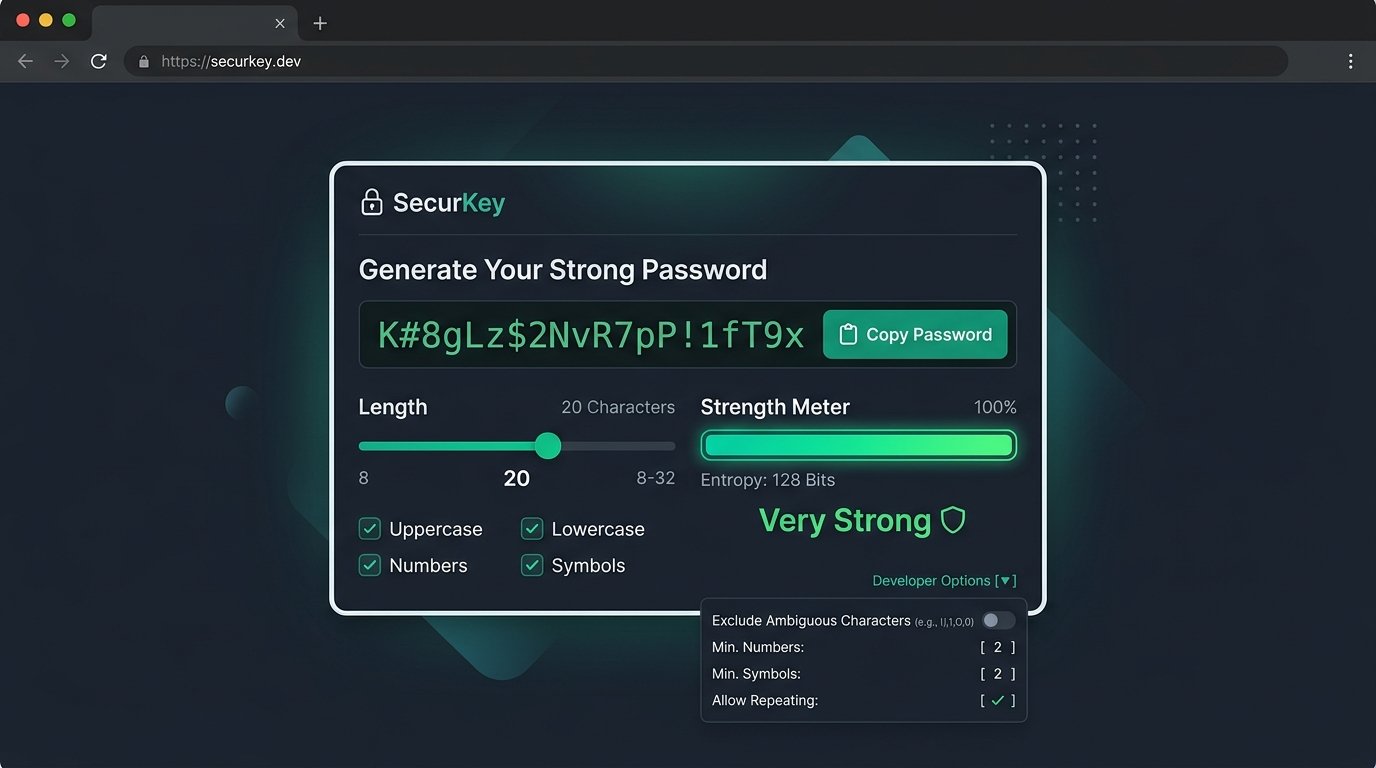
By utilizing our client-side Strong Password Generator, individuals and system administrators can produce cryptographically bulletproof passwords directly within local memory. Because the generation process executes entirely inside your web browser without communicating with external web servers, your new credentials remain strictly confidential from the instant of creation.
2. The Mathematics of Information Entropy: Shannon’s Formula in Password Security
In computer science and modern cryptography, password strength is not measured by subjective perception, emotional confidence, or visual complexity. It is quantified through an exact mathematical metric: Information Entropy. Conceptualized in 1948 by American mathematician and electrical engineer Claude Shannon in his landmark paper on communication theory, Shannon Entropy measures the average amount of unexpected information or uncertainty produced by a random data source.
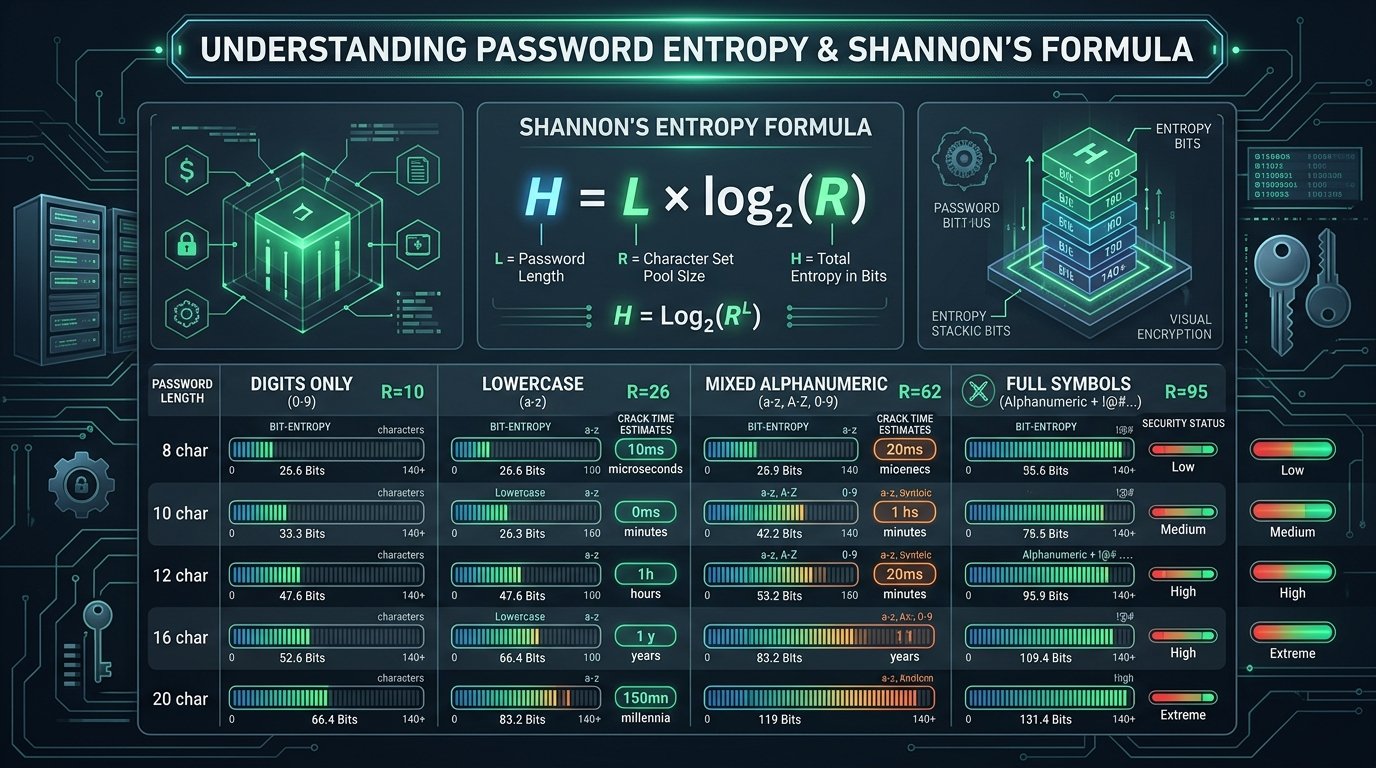
The Mathematical Entropy Formula
When an automated Password Generator selects characters uniformly from a defined pool, the total entropy of the generated string (measured in bits) is calculated using the following equation:
Where L represents the length of the generated password (total character count), and R represents the size of the character pool (the radix or total number of unique candidate symbols available during character selection). Each bit of entropy doubles the mathematical difficulty of a brute-force attack. A password possessing 60 bits of entropy requires an attacker to check 260 combinations, while an 80-bit password demands 280 combinations—a computational barrier one million times more difficult.
Character Pool Sizes and Their Impact
The value of R expands dynamically based on the character sets configured within your Password Generator:
- Numeric digits only (0–9): R = 10 symbols (≈ 3.32 bits of entropy per character).
- Lowercase alphabet only (a–z): R = 26 symbols (≈ 4.70 bits of entropy per character).
- Alphanumeric mixed case (a–z, A–Z, 0–9): R = 62 symbols (≈ 5.95 bits of entropy per character).
- Full ASCII symbol set (a–z, A–Z, 0–9, + 32 punctuation marks): R = 94 symbols (≈ 6.55 bits of entropy per character).
Notice the mathematical relationship: doubling the length of your password exponentially increases entropy far more effectively than merely adding a single special symbol. A 16-character alphanumeric password generated by a Password Generator achieves over 95 bits of entropy, which exceeds the collective cracking capacity of all supercomputers currently operating on Earth.
3. CSPRNG vs. Pseudo-Random Number Generators: Why Math.random() is Broken
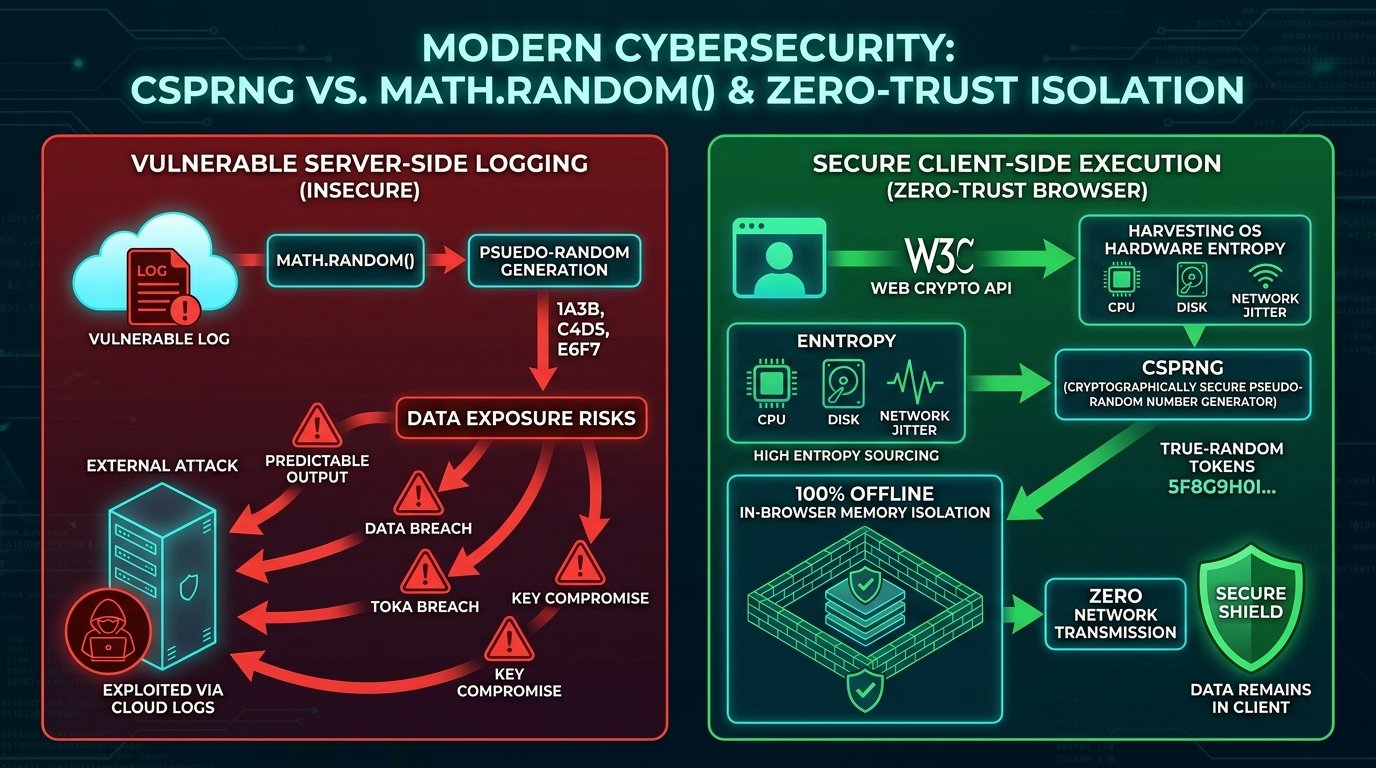
A critical architectural question in software engineering is how a Password Generator produces its random selections. Not all random number algorithms are engineered equally. In web development, many naive scripts rely on the standard JavaScript runtime method Math.random(). While suitable for basic game mechanics, card shuffling, and visual animations, using Math.random() for password creation is a catastrophic security vulnerability.
Why Math.random() is Cryptographically Broken
Standard programming library functions like Math.random() are classified as Pseudo-Random Number Generators (PRNGs). Modern web browsers typically implement PRNGs using the xorshift128+ algorithm. While xorshift128+ is exceptionally fast and produces numbers that appear evenly distributed to the naked eye, it is completely deterministic.
An algorithm of this class relies on an internal numerical seed. If an attacker observes just a handful of sequential outputs generated by Math.random(), they can mathematically reconstruct the internal 128-bit state of the generator. Once the internal state is known, the attacker can calculate every past number and predict every future number with 100% precision. Consequently, any credentials produced by a Math.random() utility can be anticipated and decrypted by an adversary.
The Cryptographically Secure Alternative: Web Crypto CSPRNG
To eliminate this vulnerability, a professional Password Generator must utilize a Cryptographically Secure Pseudo-Random Number Generator (CSPRNG). Modern web standards provide native CSPRNG access through the W3C Web Cryptography API, exposed in modern browsers via window.crypto.getRandomValues().
Operating System Hardware Entropy Harvesting
Unlike deterministic userland algorithms, CSPRNGs gather environmental physical entropy directly from your device operating system kernel (such as /dev/urandom on Linux/macOS or the CNG Cryptographic Primitives Library on Microsoft Windows). This includes hardware thermal sensor noise, microsecond timing fluctuations between hard drive disk reads, mouse movements, and CPU interrupt timings. Our in-browser Password Generator feeds this true hardware randomness into a CSPRNG buffer, rendering password prediction physically impossible.
4. 9 Best Ways to Create Secure Passwords with a Password Generator
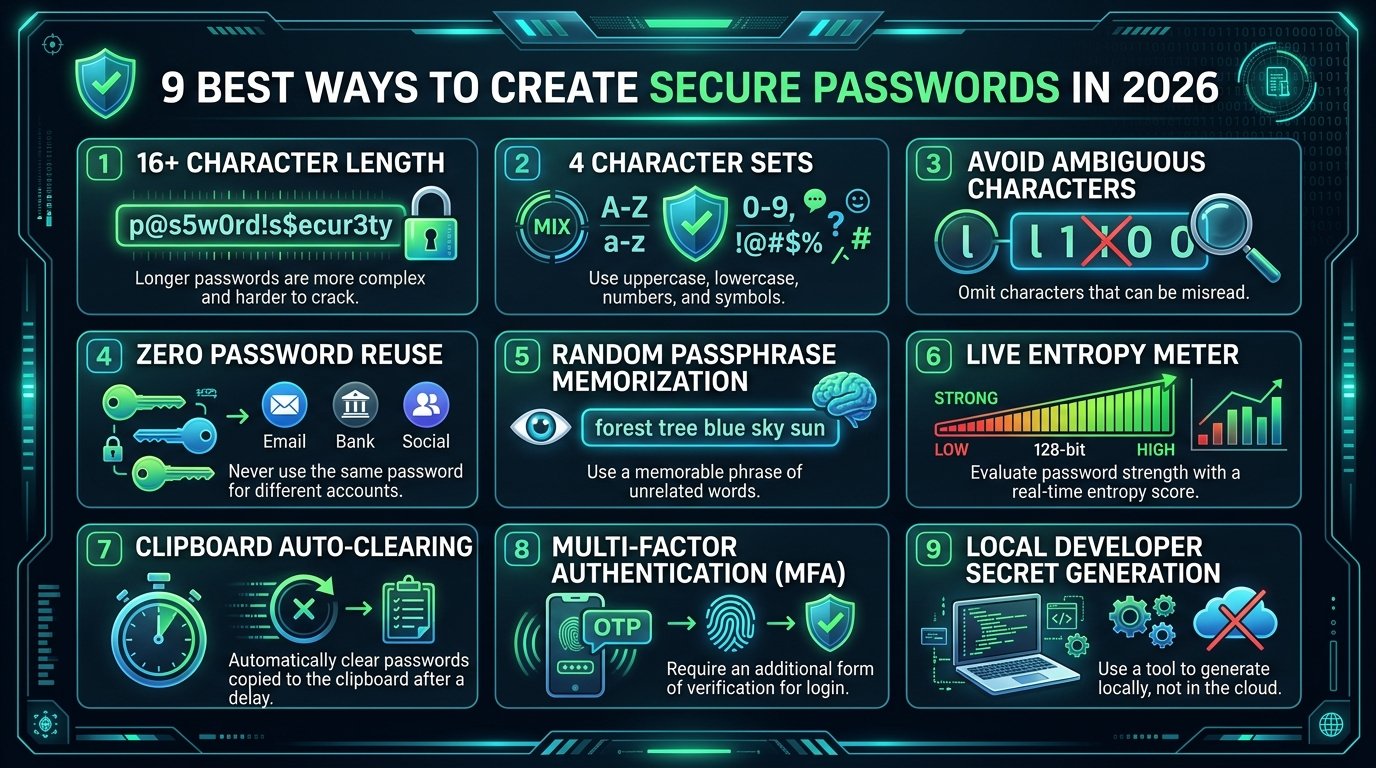
Maximizing the security value of a modern Password Generator requires understanding practical configuration workflows. Below are the 9 best industry-tested strategies for generating, managing, and deploying uncrackable credentials across your digital footprint:
1. Target a Minimum Length of 16 to 20 Characters
Length is the single most dominant factor in defeating brute-force attacks. While older corporate portals enforced outdated 8-character requirements, modern cybersecurity benchmarks dictate a minimum baseline of 16 characters for consumer accounts and 20 to 32 characters for privileged systems. Configuring your Password Generator to 20 characters guarantees over 130 bits of entropy.
2. Combine All Four Character Sets Uniformly
Ensure that your Password Generator activates uppercase letters (A–Z), lowercase letters (a–z), numerical digits (0–9), and punctuation symbols simultaneously. Maximizing the character radix ensures that each additional position adds 6.55 bits of mathematical entropy, forcing cracking dictionaries to search through astronomical permutation spaces.
3. Eliminate Confusing and Ambiguous Characters for Manual Entry
If you must transcribe credentials manually onto a mobile phone, smart television, or console terminal, ambiguous characters represent a major operational friction point. Characters such as uppercase I, lowercase l, the digit 1, uppercase O, and digit 0 look nearly indistinguishable in many system typefaces. A capable Password Generator provides an option to exclude ambiguous glyphs while maintaining overall length.
4. Never Reuse a Generated Password Across Multiple Services
Credential stuffing is one of the most prolific attack vectors on the modern internet. When a minor forum or utility website suffers a data breach, hackers extract leaked email and password combinations and immediately test them across thousands of other high-value services, including PayPal, Amazon, and Gmail. Even the strongest 32-character string produced by a Password Generator is completely compromised if reused across different domains.
5. Generate Distinct High-Entropy Passphrases for Human Memorization
For master passwords—such as the single master key that unlocks your encrypted password manager—memorizing a string like k9#mP!92$vLq@8xZ is impractical. Instead, utilize a passphrase approach. By stringing together five or six randomly selected, non-associated dictionary words (e.g., correct-horse-battery-staple), you achieve 70+ bits of entropy while preserving human cognitive memorability.
6. Audit Live Entropy Scores Before Final Deployment
Do not guess whether a password is secure. A modern Password Generator incorporates real-time entropy calculation gauges that assess raw bit strength as you adjust length and character filters. Verify that your generated credential scores above 80 bits (classified as “Strong”) before assigning it to production systems.
7. Leverage Browser Clipboard Auto-Clearing
When you click copy on a newly minted secret from a Password Generator, the string enters your operating system clipboard. Malicious background scripts and rogue software can monitor clipboard state. Always paste credentials directly into your destination application or password manager, and clear the clipboard immediately to prevent unauthorized memory inspection.
8. Pair Generated Passwords with Multi-Factor Authentication (MFA)
No password, regardless of its mathematical entropy, is immune to physical device theft, browser session hijacking, or malicious phishing proxies. Treat your Password Generator output as the first layer of defense. Pair every critical account with hardware security keys (such as FIDO2 / WebAuthn tokens) or time-based one-time password (TOTP) authenticator applications.
9. Generate Cryptographic Salts and Application Secrets Locally
Software developers frequently require random strings for hashing salts, JWT signing secrets, session cookies, and API auth tokens. Using an in-browser Password Generator ensures that developer secrets are generated in an isolated local environment without leaking into cloud server telemetry or build logs.
5. Zero-Trust Security: Why In-Browser Password Generation Protects Credentials
When generating confidential passwords, where the computation takes place is just as important as the strength of the mathematical algorithm. In the early days of online utilities, websites generated passwords on backend web servers and transmitted the plaintext string back to the user over HTTP. This legacy cloud model introduces severe security hazards.
The Hidden Perils of Cloud-Based Generation
If an online tool generates passwords on an external server, several vulnerabilities arise:
- Server-Side Logging: Web servers routinely record incoming HTTP requests and response payloads in access logs, debugging traces, and centralized analytics clusters. Plaintext passwords can inadvertently be archived in plaintext log files accessible to engineers and third-party SaaS vendors.
- Network Interception: Even over encrypted HTTPS connections, intermediate corporate proxies, CDN edge nodes, and compromised TLS termination points can inspect web traffic.
- Subpoena and Data Breach Exposure: Any database or storage cache that temporarily retains generated tokens can be subpoenaed by foreign jurisdictions or breached by malicious attackers.
The In-Browser Zero-Trust Architecture
At ulovepdfs, our utilities are engineered around a strict Zero-Trust philosophy. When you use our in-browser Password Generator, the entire logic is bundled in client-side JavaScript. The browser consumes local OS hardware entropy, populates an internal Uint8Array, maps indices against character tables, and displays the result directly in your DOM.
You can verify this complete isolation independently: open your browser Developer Tools (F12), switch to the Network tab, and click the Generate button repeatedly. You will observe that zero HTTP requests are transmitted across the wire. In fact, you can disconnect your computer from the internet entirely, and the Password Generator will continue to function flawlessly in local memory.
6. Modern Password Policies: Deconstructing the NIST SP 800-63B Standard
For over two decades, corporate IT departments enforced archaic password rules that frustrated employees while actively weakening security: requiring combinations of special symbols, forbidding repeated letters, and mandating mandatory password resets every 60 or 90 days. In recent years, the NIST SP 800-63B Digital Identity Guidelines published by the National Institute of Standards and Technology officially repudiated these legacy practices.
Why Periodic Password Rotation is Counterproductive
NIST research revealed that when users are forced to change their passwords arbitrarily every few months, they do not create stronger credentials. Instead, they make predictable incremental modifications to existing passwords—such as changing Summer2025! to Autumn2025!. This practice degrades actual entropy while creating user frustration. NIST now explicitly recommends against periodic password expiration unless there is verifiable evidence of a security breach.
The Shift from Composition Rules to Length and Entropy
Similarly, strict composition rules (e.g., “must contain at least one uppercase letter, one digit, and one symbol”) were proven to result in predictable placement patterns: users consistently capitalize the first letter and append an exclamation mark and digit to the end. NIST guidelines prioritize length over artificial rules, recommending systems support passphrases up to 64 characters long and compare prospective passwords against breached credential blocklists.
By using an automated Password Generator to create long, truly random 20-character strings stored in a secure password vault, individuals naturally comply with modern NIST guidelines without enduring cognitive fatigue.
7. Brute-Force Feasibility and Hardware Realities: GPU Clusters and HashCat
To understand why password length and entropy are critical, it helps to examine modern hardware cracking capabilities. Cybercriminals and penetration testers utilize dedicated offline password recovery rigs equipped with multiple enterprise graphics processing units (such as NVIDIA RTX 4090 clusters) running specialized software like Hashcat.

Cracking Speeds by Hashing Algorithm
A modern 8-GPU rig can execute brute-force dictionary attempts at staggering velocities, depending on the underlying cryptographic hashing algorithm utilized to store the password:
| Hashing Algorithm | 8x GPU Hash Speed | Time to Crack 8-Char Alphanumeric | Time to Crack 16-Char Generator String |
|---|---|---|---|
| MD5 (Legacy) | ~1.2 Trillion Hashes / sec | < 1 Second | > 2.5 Billion Years |
| SHA-1 (Deprecated) | ~380 Billion Hashes / sec | ~4 Seconds | > 8 Billion Years |
| SHA-256 (Standard) | ~150 Billion Hashes / sec | ~11 Seconds | > 20 Billion Years |
| bcrypt / Argon2id (Modern KDF) | ~80,000 Hashes / sec | ~8.6 Days | Heat Death of Universe |
As this benchmark data proves, an 8-character password—even if it includes special characters—offers virtually zero protection against modern GPU hardware. Conversely, a 16-character string produced by a Password Generator elevates cracking duration into billions of centuries, ensuring total mathematical invulnerability against brute-force extraction.
8. Enterprise and Developer Workflows: API Keys, Salts, and Dotenv Secrets
While consumer users utilize a Password Generator to protect personal email and banking logins, software engineers, DevOps practitioners, and system administrators rely on high-entropy generation for technical infrastructure requirements.
1. Environment Variables and Dotenv (.env) Files
Modern backend web applications—whether constructed in Node.js, Python Django, Laravel, or Go—rely on environment variables to store mission-critical configuration parameters. These include database passwords, Redis authentication tokens, symmetric encryption keys (such as AES-256 keys), and webhook secret tokens. Using an automated Password Generator allows engineers to generate cryptographically random 64-character hex strings or alphanumeric tokens directly in terminal sessions or browser windows without risking accidental leaks.
2. Database Root Credentials and Connection Strings
Production database instances (such as PostgreSQL, MySQL, and MongoDB clusters) must never utilize generic or mnemonic administrative passwords. When provisioning cloud database instances on AWS RDS, Google Cloud SQL, or DigitalOcean, configuring a 32-character string from a Password Generator prevents database enumeration and unauthorized external connection attempts.
3. Cryptographic Salt Generation for Hashing
When engineering user authentication systems, developers must salt passwords before computing hashes to defeat precomputed rainbow table attacks. Utilizing high-entropy random bytes from a Password Generator guarantees that each user account receives a completely unique salt value, neutralizing rainbow table indexing.
9. Comparative Matrix: In-Browser Password Generator vs. Cloud Tools vs. Password Managers
Understanding the strengths and trade-offs of different credential generation methods allows individuals and organizations to adopt optimal security practices:
| Feature / Metric | In-Browser Password Generator | Cloud-Based Online Tool | Dedicated Password Manager |
|---|---|---|---|
| Execution Environment | 100% Client-Side Browser Memory | Remote Backend Server | Local Device Application |
| Network Transmission | Zero Bytes (Completely Offline) | Plaintext over HTTP/HTTPS | Zero Bytes (Local Generation) |
| Randomness Source | Web Crypto CSPRNG (Hardware Entropy) | Server PRNG / System Random | OS Kernel CSPRNG |
| Account Requirement | Zero Registration / Instant | Often requires login or ad views | Requires master account and vault |
| Credential Storage | Stateless (Copy and Store Manually) | May be cached in server logs | Encrypted Zero-Knowledge Vault |
| Best Use Case | Instant, private, untracked creation | Not recommended for sensitive data | Long-term storage and auto-fill |
The optimal security posture involves combining these technologies: utilize our in-browser Password Generator whenever you need to create immediate, isolated, and untracked credentials or infrastructure tokens, and preserve your created passwords inside a reputable end-to-end encrypted password manager.
10. Complementary Utilities in the Cybersecurity and Encryption Ecosystem
Password security is only one component of a modern digital workflow. At ulovepdfs, we maintain a comprehensive suite of high-performance, in-browser developer and utility tools designed to safeguard privacy, format code, and streamline computing tasks:
SHA-256 Hash Generator
Calculate military-grade 256-bit SHA-2 cryptographic checksums instantly in your browser to verify software package integrity, validate database records, and verify digital signatures.
UUID / GUID Generator
Generate cryptographically unique RFC 4122 Version 4 UUIDs in single or bulk batches for distributed database primary keys, session tracking, and microservices architectures.
Base64 Encoder & Decoder
Safely encode text strings, binary data, and authentication credentials into standard Base64 representation for HTTP authorization headers and data URI embedding.
JSON Formatter & Validator
Parse, validate, and beautify complex JSON API payloads and configuration files with real-time syntax error highlighting and minification controls.
Word & Character Counter
Measure document length, character thresholds, reading time estimates, and Flesch reading ease scores in real time for content marketing and publishing.
Pomodoro Focus Timer
Supercharge deep work and productivity using structured 25-minute focus intervals and restorative breaks with audio notifications and browser tab alerts.
11. Frequently Asked Questions (FAQ) About Password Security
Is it safe to generate passwords using an online web tool?
Yes, provided that the tool operates strictly client-side using native browser cryptography. Our in-browser Password Generator executes 100% within your local device memory using the W3C Web Cryptography API. No plaintext passwords, entropy buffers, or usage metrics are ever transmitted over the network or recorded on backend servers.
What is the minimum recommended length for a secure password?
Under official NIST SP 800-63B guidelines, user passwords should be at least 16 characters long. For sensitive accounts such as banking portals, email accounts, and cloud administrative consoles, we recommend configuring your Password Generator to 20 or more characters to achieve over 130 bits of entropy.
Why shouldn’t I use words with special character substitutions like P@ssw0rd?
Automated password cracking engines utilize “mangling rules” that specifically simulate common human substitutions. Cracking software automatically swaps a with @, e with 3, i with 1, and o with 0. These substitutions add virtually zero mathematical entropy against dictionary attacks. A truly random string produced by a Password Generator is exponentially more secure.
How often should I change my passwords?
According to modern cybersecurity standards, you should only change a password if there is reason to believe the credential has been compromised in a security breach. Arbitrary periodic password resets (such as every 90 days) encourage predictable pattern shifts that degrade security. Focus on creating unique, high-entropy passwords with a Password Generator and pairing them with multi-factor authentication.
Can a quantum computer crack passwords generated today?
Symmetric password security is exceptionally resilient against theoretical quantum computing attacks. While Shor’s algorithm threatens asymmetric public-key cryptosystems (such as RSA and ECC), Grover’s quantum search algorithm only provides a quadratic speedup against symmetric key searches. A 20-character password generated by an in-browser Password Generator possessing 130 bits of entropy would still require 265 quantum operations to crack—a computational threshold far beyond practical reach.
Written by editor
Full-stack engineer and privacy advocate at ulovepdfs, focusing on browser-native cryptography and high-performance client-side tooling.