

1. What is a Base64 Encoder and Why is it Essential in 2026?
A high-performance Base64 Encoder is an indispensable utility across the contemporary software engineering landscape. In modern distributed cloud infrastructures, RESTful microservices, event-driven message queues, and client-heavy web applications, computer systems frequently need to transmit arbitrary binary data across communication channels that were originally designed strictly for printable ASCII text. Whether you are embedding responsive image icons directly into HTML style sheets, transmitting cryptographic keys through HTTP headers, serializing authorization claims within JSON Web Tokens (JWT), or sending file attachments across legacy email protocols, a Base64 Encoder provides the foundational bridge between raw binary byte sequences and safe, transportable text strings.
The historical genesis of Base64 encoding stems from early network architecture limitations. Traditional communication protocols—most notably the Simple Mail Transfer Protocol (SMTP) and early HTTP implementations—were engineered around 7-bit ASCII transmission lines. When raw 8-bit binary streams (such as compiled executable binaries, compressed zip archives, or JPEG images) passed through these legacy gateways, intermediate mail relays and telecommunication routers routinely manipulated, stripped, or corrupted high-order parity bits. Furthermore, specialized control characters, byte order marks, and line termination variations (such as CRLF versus LF) frequently broke binary payloads beyond recovery.
To overcome these networking hurdles without overhauling physical networking hardware, computer scientists developed binary-to-text encoding schemes. Among these methodologies, Base64 emerged as the undisputed global standard. By representing arbitrary binary streams using a carefully selected alphabet of 64 printable ASCII characters, a modern Base64 Encoder guarantees that payloads pass through any web proxy, firewall, API gateway, or database storage layer without character distortion or accidental truncation.
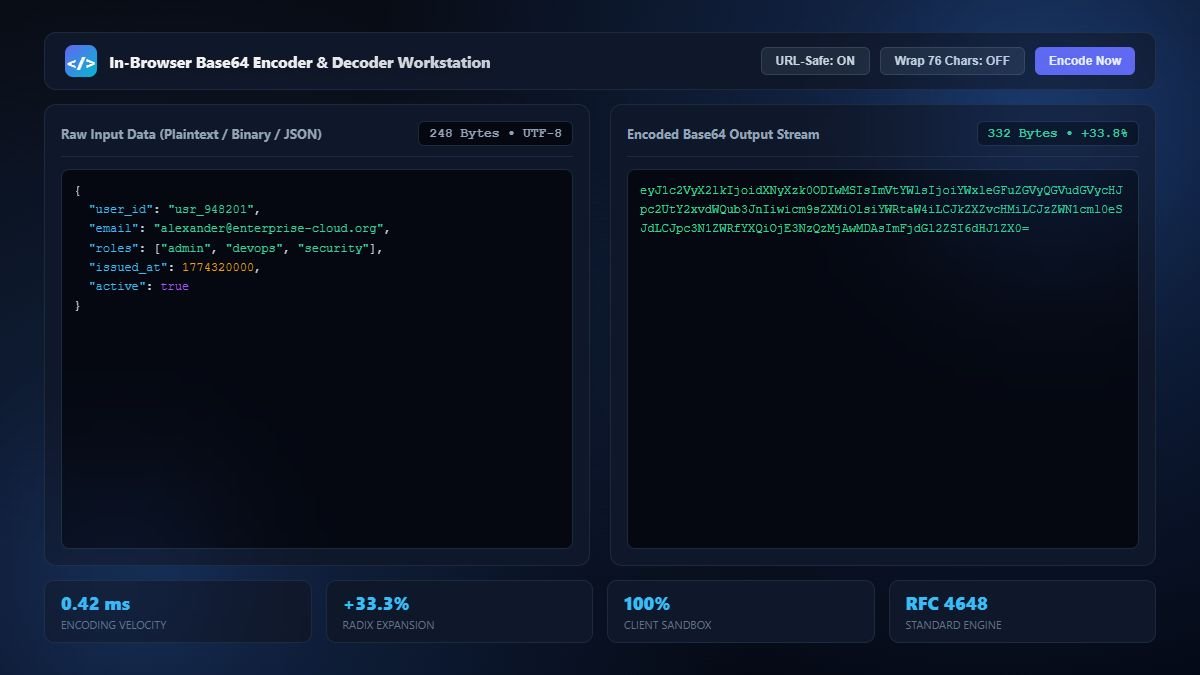
In 2026, the utility of an online Base64 Encoder extends far beyond basic email routing. Frontend engineers utilize a Base64 Encoder to generate inline Data URIs, eliminating supplementary HTTP requests for critical rendering path assets. Backend developers employ a Base64 Encoder to decode Base64-encoded webhook payloads, debug OAuth2 credentials, and inspect security certificates. Using our interactive in-browser Base64 Encoder & Decoder, engineers can perform bi-directional encoding and decoding instantly at native machine velocities without transmitting proprietary corporate data over the public internet.
2. Under the Hood: The 8-Bit to 6-Bit Mathematical Conversion Pipeline
To understand the mechanics of an efficient Base64 Encoder, one must explore the underlying bitwise mathematics that govern the transformation of binary octets into Radix-64 character sequences. At its mathematical core, Base64 is not an encryption algorithm, nor is it a data compression mechanism. Rather, it is a deterministic, reversible Radix-64 positional notation system that translates 8-bit bytes into 6-bit sextets.
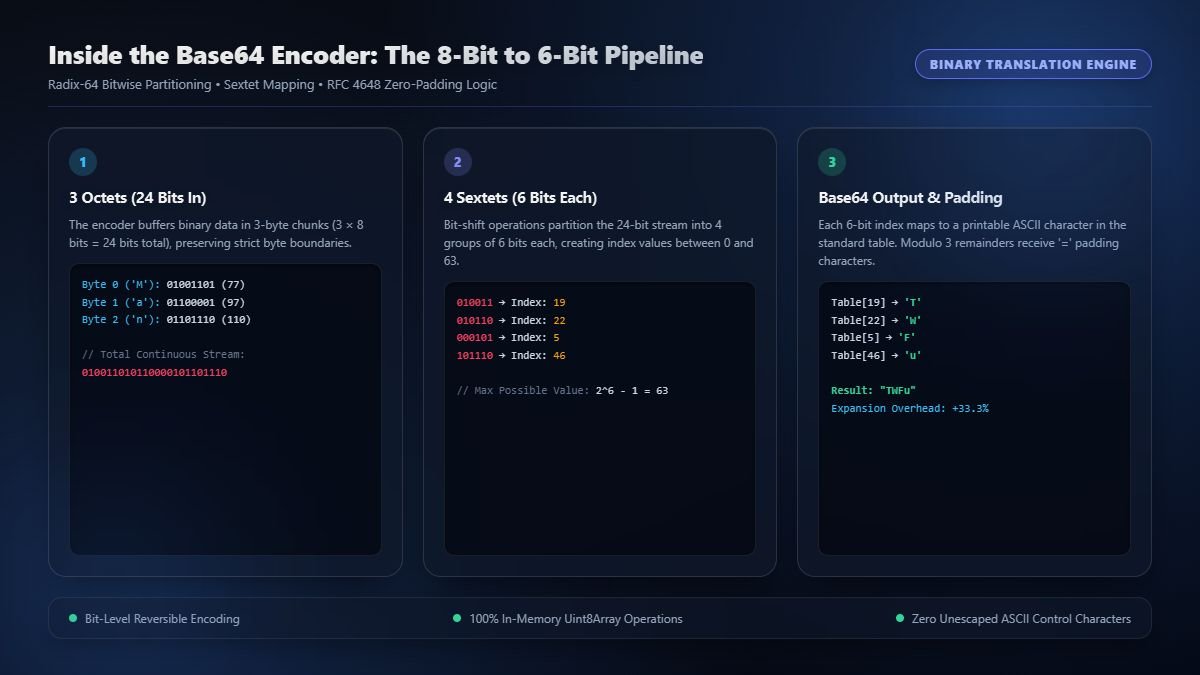
Stage 1: 24-Bit Byte Triplet Buffering
Computers process standard memory in units of 8-bit bytes (octets). Because 8 is not evenly divisible by 6, the lowest common multiple between 8 and 6 is 24 (since 8 × 3 = 24 and 6 × 4 = 24). Consequently, a Base64 Encoder processes incoming data streams in sequential groups of three 8-bit bytes. When three contiguous bytes are grouped together, they form a unified 24-bit continuous bitstream:
- Byte 1: Represents bits 23 through 16 of the buffer.
- Byte 2: Represents bits 15 through 8 of the buffer.
- Byte 3: Represents bits 7 through 0 of the buffer.
Stage 2: Bitwise Sextet Partitioning and Index Extraction
Once the 24-bit buffer is assembled, the Base64 Encoder applies bit-shift operations and bitwise masking (AND 0x3F) to partition the 24 bits into four discrete 6-bit numbers, called sextets. Because each sextet contains exactly 6 bits, its numerical value ranges from 0 (binary 000000) to 63 (binary 111111), which corresponds precisely to 2 to the 6th power (64 distinct combinations).
Stage 3: Radix-64 Table Lookup and Modulo Padding
Each of the four extracted 6-bit numbers serves as an array index into the standardized 64-character lookup table. For instance, an index value of 0 maps to uppercase letter 'A', index 26 maps to lowercase letter 'a', and index 52 maps to numeric digit '0'. In this manner, three raw binary bytes are transformed into four printable ASCII characters.
Because every 3 bytes of input generate exactly 4 bytes of output, every Base64 Encoder introduces a predictable mathematical expansion overhead of exactly 33.33% (or a ratio of 4/3). If the input data length is not evenly divisible by 3, the Base64 Encoder appends zero bits to complete the final sextet and adds special padding characters ('=') to ensure the total string length remains a multiple of 4.
3. RFC 4648 Specifications, Base64 Alphabet, and Padding Rules
Base64 encoding is formally governed by international specifications published by the Internet Engineering Task Force. The authoritative document defining modern implementations is IETF RFC 4648: The Base16, Base32, and Base64 Data Encodings. Furthermore, web standards maintained by the MDN Web Docs Base64 Specification and the WHATWG Forgiving-Base64 Standard clarify how browsers must parse encoded content.
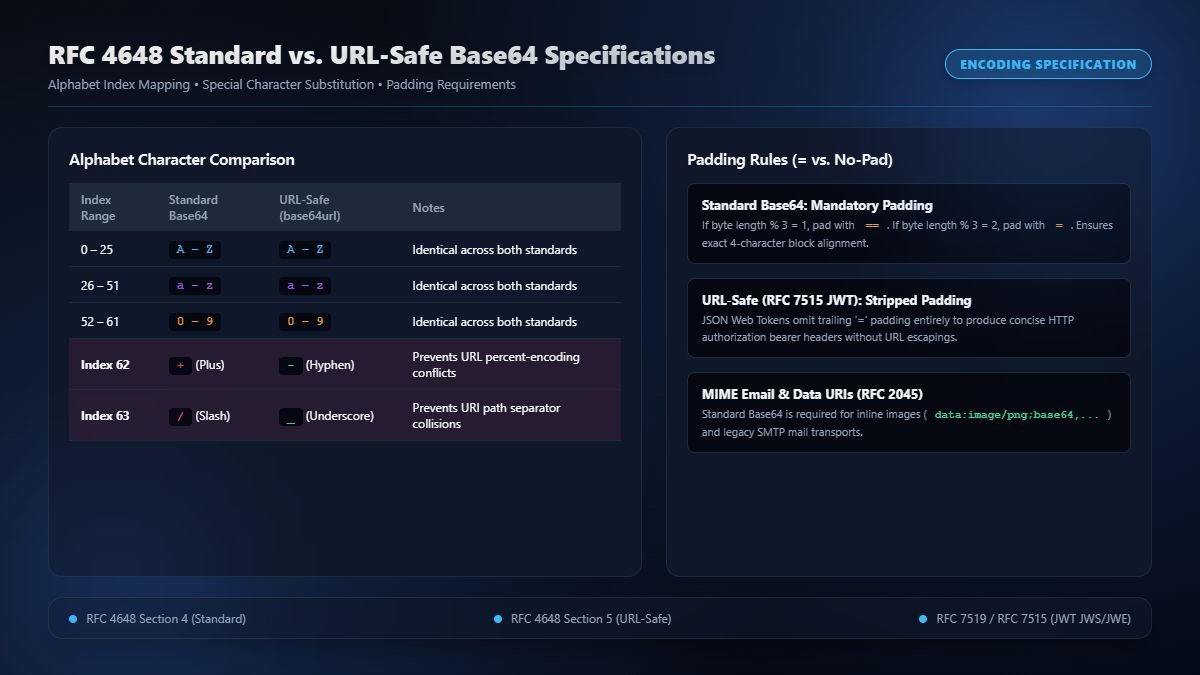
The Standard Base64 Character Set (RFC 4648 Section 4)
The standard Base64 alphabet uses 65 total ASCII characters (64 printable glyphs plus one dedicated padding character):
- Uppercase Alphabetic (Indices 0–25): ASCII characters
AthroughZ(hexadecimal values0x41to0x5A). - Lowercase Alphabetic (Indices 26–51): ASCII characters
athroughz(hexadecimal values0x61to0x7A). - Numeric Digits (Indices 52–61): ASCII characters
0through9(hexadecimal values0x30to0x39). - Punctuation Symbol 62 (Index 62): The plus sign
+(ASCII0x2B). - Punctuation Symbol 63 (Index 63): The forward slash
/(ASCII0x2F). - Padding Delimiter: The equals sign
=(ASCII0x3D).
The URL-Safe Base64 Variant: “base64url” (RFC 4648 Section 5)
While the standard character set functions impeccably across file transfers and email attachments, it introduces severe friction when used in web URLs, query strings, and HTTP cookie values. In uniform resource locators, the characters + and / hold reserved syntactic meanings: the forward slash defines path hierarchies, while the plus sign is frequently interpreted by web application servers as an encoded space character. If a standard Base64 string is included in a URL query parameter without escaping, parsers will corrupt the data.
To eliminate this friction, RFC 4648 Section 5 established the URL-Safe Base64 alphabet (commonly designated as base64url):
- Index 62 changes from
+to the hyphen-(ASCII0x2D). - Index 63 changes from
/to the underscore_(ASCII0x5F). - Padding equals signs (
=) are typically stripped altogether, as seen in the official RFC 7515 JSON Web Signature (JWS) specification.
The Exact Mathematical Rules of Modulo 3 Padding
Whenever you pass data into a Base64 Encoder, the input byte length modulo 3 dictates the exact trailing structure. If the byte count divided by 3 has a remainder of 0, no padding is added. If the remainder is 1, the encoder buffers 8 bits, appends 4 zero bits to make two 6-bit sextets, and pads the remaining two slots with two equals signs (==). If the remainder is 2, the encoder buffers 16 bits, appends 2 zero bits to make three sextets, and pads the final slot with one equals sign (=).
4. 9 Best Ways to Encode and Decode Data with a Base64 Encoder in 2026
Using a production-grade Base64 Encoder is about far more than pasting arbitrary text into a textarea. In mission-critical enterprise environments, developers apply structured patterns to guarantee encoding fidelity, minimize memory overhead, and defend against injection vulnerabilities. Below are nine established best practices for maximizing the efficiency of your Base64 Encoder:
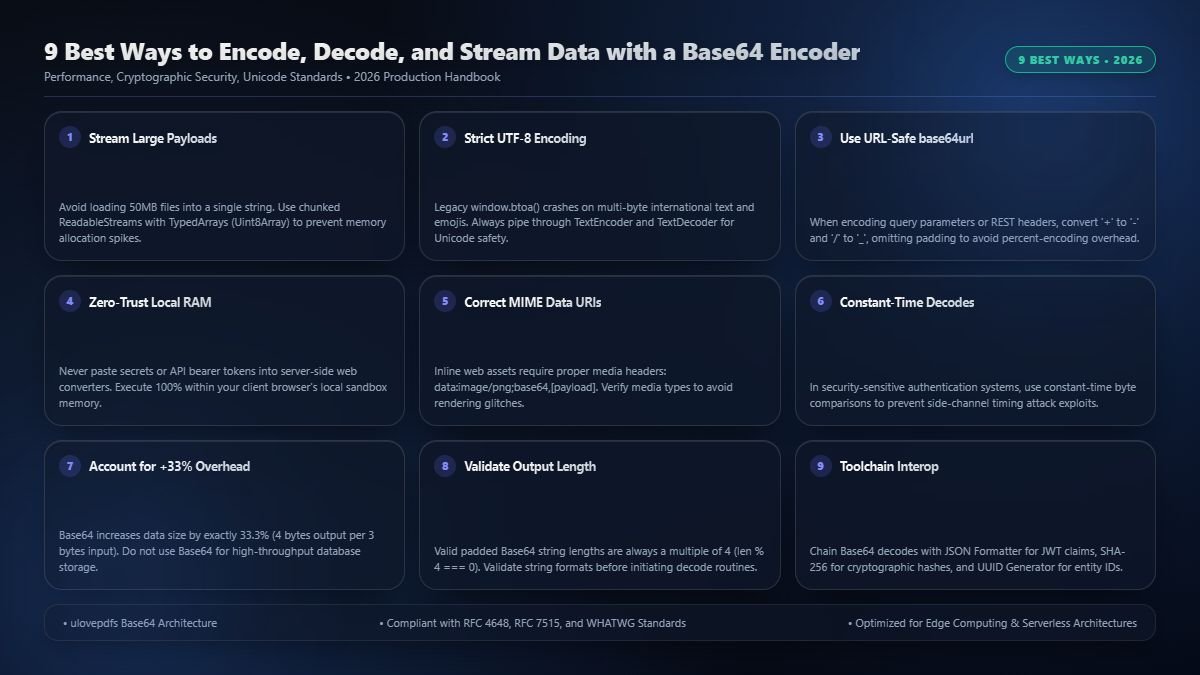
1. Stream Large Files Using Chunked TypedArrays
A frequent mistake in full-stack development is attempting to load multi-megabyte files (such as 40MB PDF manuals or 100MB video fragments) into a monolithic JavaScript string before invoking a Base64 Encoder. In browser environments, allocating massive contiguous strings triggers rapid memory exhaustion and browser tab freezing. Instead, process payloads in streaming chunks using Uint8Array typed arrays and browser ReadableStream pipelines. This maintains a steady memory footprint and ensures uninterrupted UI responsiveness.
2. Enforce Strict Multi-Byte UTF-8 String Pre-Processing
Legacy browser environments provided the built-in functions window.btoa() and window.atob(). However, these legacy primitives were written in the 1990s and operate exclusively on Latin-1 (binary string) character ranges (0x00 through 0xFF). If you pass a multi-byte Unicode string containing international characters, accents, or emojis (such as "Data • 🔐 • 日本語") directly into btoa(), the browser immediately throws an uncaught DOMException: The string to be encoded contains characters outside of the Latin1 range. Always pipe strings through modern TextEncoder and TextDecoder APIs before invoking a Base64 Encoder.
3. Toggle to URL-Safe “base64url” for Web Tokens and Parameters
When engineering API query parameters, OAuth2 state tokens, or custom session tickets, always configure your Base64 Encoder to output URL-safe strings. By automatically substituting + with - and / with _ while omitting trailing padding characters, you prevent downstream HTTP reverse proxies (such as Nginx, Cloudflare, or AWS CloudFront) from corrupting payload parameters during URL normalization.
4. Adopt Zero-Trust Client-Side Formatting for Proprietary Keys
Developers routinely handle sensitive tokens: private RSA keys, database connection strings, JWT bearer authorization headers, and AWS access secrets. Pasting these confidential credentials into legacy third-party online converters transmits your proprietary keys over public networks to unknown remote servers. Always utilize an in-browser Base64 Encoder that executes 100% within your local device memory sandbox.
5. Ensure Proper MIME Type Prefixing for Inline Data URIs
When using a Base64 Encoder to embed visual assets directly into CSS backgrounds or HTML elements, formatting the Data URI header correctly is essential. A valid Data URI follows the syntax: data:[<mediatype>][;base64],<data>. Failing to specify the exact MIME type (e.g., omitting image/svg+xml or image/png) causes modern browsers to default to text/plain;charset=US-ASCII, which corrupts binary asset rendering.
6. Guard Against Timing Attacks During Cryptographic Token Validation
When decoding and verifying Base64-encoded digital signatures or HMAC authentication tokens on server backends, never compare decoded byte arrays using standard equality operators (such as === or ==). Standard comparisons exit early on the first mismatched byte, exposing your application to side-channel timing attacks. Always utilize constant-time comparison methods, such as Node.js crypto.timingSafeEqual().
7. Account for the Mandatory 33.33% Storage Overhead
Because every 3 bytes of input expand into 4 bytes of Base64 text, encoding binary data increases size by exactly one-third. If you are storing millions of documents or images in database records (such as PostgreSQL or MongoDB), do not store raw Base64 strings. Always store native binary byte arrays (such as BLOB or BYTEA) in your persistent storage layer, and only engage a Base64 Encoder at the presentation boundary when required for transport.
8. Validate Encoded String Length and Character Modulo
Before passing untrusted user input into your decoding pipeline, implement defensive input validation. A valid standard Base64 string must have a length that is an exact multiple of 4 (string.length % 4 === 0). Furthermore, any padding characters (=) may only appear at the very end of the string (maximum two). Performing this lightweight pre-check prevents deep parsing exceptions and resource-exhaustion denial-of-service (DoS) vectors.
9. Chain Base64 Workflows with Complementary Developer Utilities
Base64 encoding rarely operates in isolation. In modern full-stack workflows, you frequently decode a Base64 JWT payload, format the unpacked JSON claims with our JSON Formatter, compute an integrity digest using our SHA-256 Hash Generator, generate unique session keys with the UUID Generator, and sanitize web parameters using our URL Encoder.
5. Zero-Trust Data Privacy: Client-Side Browser Memory vs. Cloud Servers
In contemporary cloud computing and enterprise software security, data privacy is non-negotiable. Software architects, DevOps engineers, and full-stack developers regularly inspect production data containing high-risk materials: OAuth access tokens, customer personal identifiable information (PII), payment gateway payloads, and API private keys. When a debugging scenario arises, copying and pasting that payload into a web tool for quick inspection is common practice.
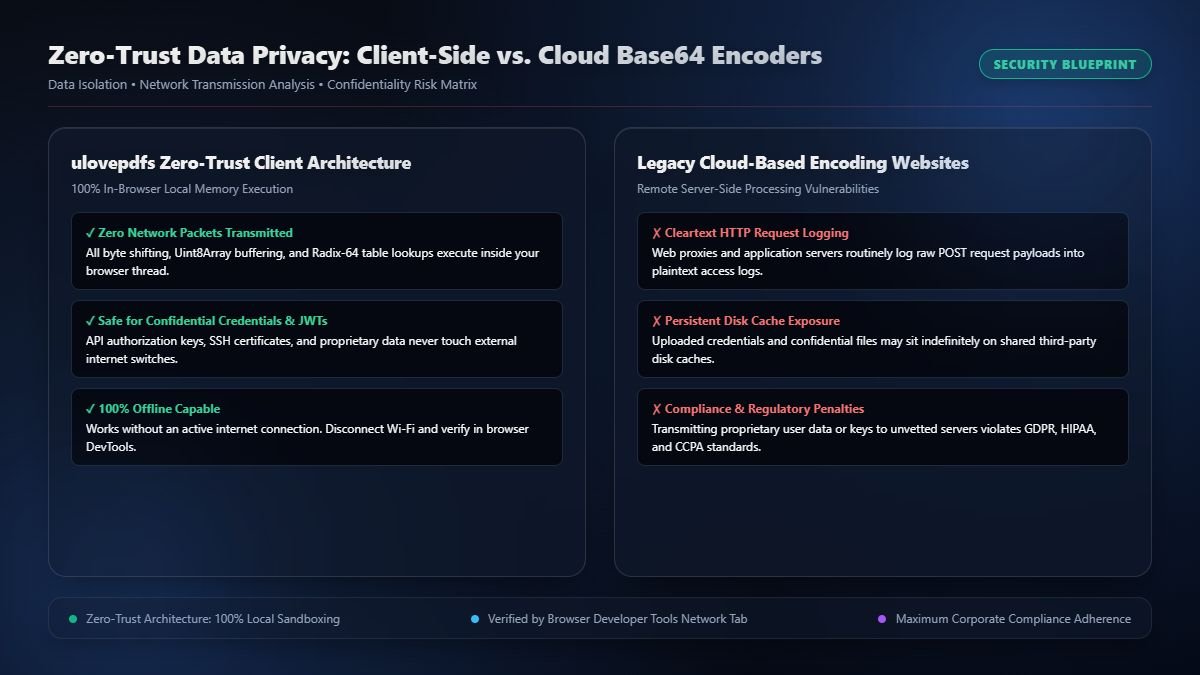
However, relying on legacy cloud-based formatting websites exposes organizations to severe security vulnerabilities. When an online tool processes conversions on remote backend servers, your confidential payload travels across public internet backbones. This introduces three catastrophic security risks:
- Uncontrolled Server Access Logging: Standard reverse proxies and web server engines (such as Apache, Nginx, or IIS) frequently record full incoming HTTP request parameters in cleartext diagnostic logs, leaving credentials vulnerable to unauthorized access.
- Residual Disk Cache Storage: Uploaded files and strings frequently persist indefinitely inside temporary scratch folders, database tables, or automated cloud backups without explicit user consent.
- Violations of International Data Sovereignty: Transmitting unencrypted customer data or healthcare records across international cloud servers directly violates compliance mandates, including GDPR, HIPAA, and SOC 2 Type II controls.
At ulovepdfs, we engineered our tools according to an uncompromising Zero-Trust Client-Side Architecture. When you utilize our Base64 Encoder, all bit shifting, TypedArray allocations, and Radix-64 table lookups execute 100% within your browser’s local sandbox memory. Zero network packets are ever dispatched to external servers. You can easily verify this by inspecting the Network monitor in your browser developer tools—or disconnect your computer from the internet entirely, and the tool will continue operating seamlessly. For further technical details on our client-side cryptographic guarantees, review our comprehensive analysis on client-side cryptography and browser security architecture.
6. Diagnosing and Resolving the 5 Most Common Base64 Encoding Errors
Even seasoned software engineers encounter baffling edge cases when encoding and decoding Base64 data streams. Understanding the root causes of these errors allows you to diagnose and resolve production failures rapidly. Here are the five most frequent Base64 pitfalls and their corresponding engineering fixes:
1. Unicode Multi-Byte String Corruption (The Latin-1 Limitation)
When attempting to encode international strings containing multi-byte characters in JavaScript using legacy btoa(), the execution runtime throws a fatal exception because btoa() cannot process code points beyond 255. To resolve this permanently, convert the string into a UTF-8 byte stream using the native TextEncoder interface before encoding:
// FAILS on Unicode: btoa("Café & 🚀"); // Throws DOMException!

// ROBUST MODERN SOLUTION:
function safeBase64Encode(str) {
  const bytes = new TextEncoder().encode(str);
  const binaryString = Array.from(bytes, b => String.fromCharCode(b)).join('');
  return btoa(binaryString);
}
console.log(safeBase64Encode("Café & 🚀")); // Encodes perfectly!
2. Truncated or Invalid Trailing Padding
When standard Base64 decoders encounter strings with missing or misplaced equals signs, they throw syntax errors such as InvalidCharacterError or Illegal base64 character. When handling unpadded strings (such as JWT payload segments), normalize the string by calculating the missing padding count before parsing:
function restoreBase64Padding(unpaddedStr) {
  const remainder = unpaddedStr.length % 4;
  if (remainder === 2) return unpaddedStr + '==';
  if (remainder === 3) return unpaddedStr + '=';
  if (remainder === 1) throw new Error('Malformed Base64 string length!');
  return unpaddedStr;
}
3. URI Component Clashes from Unescaped Plus and Slash Characters
When a standard Base64 string containing + characters is passed into an HTTP GET query parameter, web servers frequently interpret the plus signs as whitespace. When decoded on the backend, spaces replace the original plus signs, corrupting the binary data. Always convert the string to the URL-safe variant by replacing + with - and / with _ before generating query strings.
4. Call Stack Overflow from Massive Spread Operations
A common pattern found in blog tutorials is converting large Uint8Array buffers to strings using String.fromCharCode(...uint8Array). When the file size exceeds approximately 65,000 bytes, JavaScript engines exceed their maximum call stack limits and throw RangeError: Maximum call stack size exceeded. Always process large byte arrays using iterative chunking loops instead of argument spreading.
5. Inadvertent Carriage Return and Line Break Ingestion
Legacy systems following RFC 2045 MIME specifications insert a newline sequence (
) every 76 characters. If these line breaks are passed into strict modern decoders without stripping whitespace, parsing errors occur. Always sanitize encoded strings by stripping whitespace characters (str.replace(/s+/g, '')) prior to decoding.
7. Cross-Language Code Implementations: Encoding and Decoding Base64
While an interactive online Base64 Encoder is ideal for rapid development and debugging, production systems require robust, automated encoding routines integrated directly into application source code. Below are production-ready code examples across leading enterprise programming languages:
JavaScript / TypeScript (Modern Browser & Node.js)
In modern Node.js environments, the native Buffer object provides high-speed binary encoding and decoding with native C++ backing:
// Node.js Buffer Encoding & Decoding
const plaintext = 'Enterprise Authorization Payload 2026';

// Standard Base64 Encoding
const encoded = Buffer.from(plaintext, 'utf-8').toString('base64');
console.log('Base64:', encoded);

// URL-Safe Base64 Encoding (base64url)
const encodedUrl = Buffer.from(plaintext, 'utf-8').toString('base64url');
console.log('Base64URL:', encodedUrl);

// Decoding back to UTF-8
const decoded = Buffer.from(encoded, 'base64').toString('utf-8');
console.log('Decoded:', decoded);
Python (Standard Library base64 Module)
Python provides the comprehensive base64 module in its standard library, supporting both standard RFC 4648 encoding and URL-safe variants:
import base64

raw_data = "Secure Cloud Infrastructure • 2026".encode('utf-8')

# Standard RFC 4648 Base64 Encoding
standard_b64 = base64.b64encode(raw_data).decode('ascii')
print(f"Standard: {standard_b64}")

# URL-Safe RFC 4648 Base64 Encoding (substitutes + and /)
urlsafe_b64 = base64.urlsafe_b64encode(raw_data).decode('ascii')
print(f"URL-Safe: {urlsafe_b64}")

# Decoding Back to String
decoded_bytes = base64.b64decode(standard_b64)
print(f"Decoded: {decoded_bytes.decode('utf-8')}")
Go (Golang Standard Library encoding/base64)
Go offers native, zero-allocation Base64 primitives inside its standard library package:
package main

import (
	"encoding/base64"
	"fmt"
)

func main() {
	message := []byte("Golang High-Performance Microservice")

	// Standard Base64 Encoding
	encodedStd := base64.StdEncoding.EncodeToString(message)
	fmt.Println("Standard Base64:", encodedStd)

	// URL-Safe Base64 (Without Padding)
	encodedURL := base64.RawURLEncoding.EncodeToString(message)
	fmt.Println("URL-Safe Base64:", encodedURL)

	// Decoding
	decoded, err := base64.StdEncoding.DecodeString(encodedStd)
	if err != nil {
		fmt.Println("Decode Error:", err)
		return
	}
	fmt.Println("Decoded String:", string(decoded))
}
Command-Line Encoding with base64 and openssl
On Unix, Linux, and macOS terminal consoles, you can encode and decode data streams instantly using standard POSIX utilities:
# Encode string to Base64 in terminal
echo -n "Production Secrets" | base64

# Decode Base64 string back to plaintext
echo -n "UHJvZHVjdGlvbiBTZWNyZXRz" | base64 --decode

# Encode a binary image file to Base64
base64 -i icon.png -o icon.b64
8. Comparative Matrix: In-Browser Base64 Encoder vs. Cloud Converters vs. CLI Tools
Software engineers have multiple options when choosing how to encode and inspect Base64 data. The comparison table below highlights why an in-browser Base64 Encoder offers the optimal balance of data privacy, operational speed, and cross-platform accessibility:
| Evaluation Metric | ulovepdfs Base64 Encoder | Legacy Cloud Websites | Command-Line (CLI) |
|---|---|---|---|
| Data Privacy | 100% Client-Side RAM (Zero Upload) | Transmitted to Remote Servers | 100% Local Terminal |
| Execution Velocity | Instant (< 1ms in V8 Engine) | Latency-Bound (250ms – 1,500ms) | Instant (Native C Binary) |
| Offline Capability | Works 100% Offline | Fails Without Active Connection | Works 100% Offline |
| URL-Safe Mode | One-Click Instant Toggle | Rarely Supported / Manual | Requires Custom tr / sed Scripts |
| Unicode UTF-8 Safety | Full International & Emoji Support | Variable (Often Corrupts Emojis) | Depends on Shell Locale |
| Software Installation | Zero Installation (Any Web Browser) | Zero Installation | Pre-installed or via Package Manager |
9. Complementary Utilities in Modern Web Development Workflows
Base64 encoding is an integral building block in contemporary web architectures. In real-world software workflows, a Base64 Encoder functions hand-in-hand with an interconnected suite of browser-based utilities. Explore these related developer tools to streamline your engineering pipeline:
- Base64 Decoder: Safely unpack encoded Base64 strings back to clean plaintext or inspect binary files with automatic padding recovery.
- JSON Formatter & Validator: Format, beautify, and validate complex JSON payload claims decoded from Base64 authentication tokens. Read our detailed guide on our in-browser JSON Formatter architecture.
- SHA-256 Hash Generator: Generate cryptographic hash digests of raw binary data before encoding to create verifiable HMAC request signatures.
- UUID / GUID Generator: Generate cryptographically randomized RFC 4122 Version 4 UUIDs for entity identifiers embedded within your Base64 payloads.
- URL / URI Encoder: Ensure special characters and parameters are compliant with RFC 3986 percent-encoding rules for web transport.
- Word & Character Counter: Accurately measure character counts, byte densities, and string lengths before setting HTTP header limits.
10. Frequently Asked Questions (FAQ) About Base64 Encoding
Is Base64 encoding a form of encryption?
No. Base64 is strictly a binary-to-text encoding format, not an encryption algorithm. Anyone who possesses a Base64 string can decode it back to its original binary or plaintext state in milliseconds without requiring a secret key or password. Never use a Base64 Encoder alone to protect confidential passwords or sensitive business data.
Why does a Base64 Encoder increase file size by 33.33%?
Base64 takes 3 bytes of raw binary input (24 bits) and represents them using 4 ASCII characters (4 bytes = 32 bits). Because 4 divided by 3 equals 1.3333, the resulting string occupies exactly 33.33% more bytes than the original binary data. This overhead is the mathematical trade-off for transport safety across text-only protocols.
What is the purpose of equals sign (=) padding in Base64?
The equals sign (=) informs decoding software how many zero bits were appended to complete the final 6-bit sextet. One equals sign indicates that 2 zero bits were padded, while two equals signs indicate that 4 zero bits were padded. This allows the decoder to restore the exact original byte count without trailing zero corruption.
What is the difference between standard Base64 and URL-Safe Base64?
Standard Base64 uses + and / for indices 62 and 63, which are reserved characters in web URLs. URL-Safe Base64 (base64url) replaces + with - (hyphen) and / with _ (underscore), and omits trailing equals sign padding. This allows the string to be safely embedded directly in URL query parameters and JSON Web Tokens without percent-encoding.
Does this Base64 Encoder transmit my sensitive keys or files to external servers?
No. The ulovepdfs Base64 Encoder operates 100% within your client browser’s local sandbox memory using native JavaScript TypedArray buffers. Zero network requests are made, ensuring complete confidentiality for your API tokens, customer records, and private certificates.
Written by editor
Full-stack engineer and privacy advocate at ulovepdfs, focusing on browser-native cryptography and high-performance client-side tooling.